Saturday, February 02, 2013

Ruby and Rails and all that stuff

At the suggestion of a recruiter, I'm learning Ruby on Rails this weekend. I was active on the comp.lang.python mailing list when Matz came around talking about Ruby. It seemed like a good thing, but I mostly ignored Ruby for years because it seemed to be solving problems that I already had solutions for with Python. Likewise, Rails seemed to retread the same ground already covered by Django.

Motivated to take another look because of the wild popularity of Rails, I see there's something in Ruby that deserves attention, which is blocks (anonymous closures, or what Lispers would call lambda expressions). They function as closures, and any language that makes a closure a first-class object is a good language. There are a ton of good Ruby tutorials. I myself am partial to Ruby in Twenty Minutes. There are also a good Rails tutorial (and I'm sure there are several others). Another notable thing in the Ruby community is RDoc, an unusually good documentation tool.

I'll be installing Ruby and Rails on an Ubuntu 12.04 machine. I don't like how old the packages are in the official Ubuntu repository, so I'll install from Ruby websites instead. The first thing to do is install RVM with these two commands:
$ curl -L https://get.rvm.io | bash -s stable --ruby
$ source /home/wware/.rvm/scripts/rvm
Later I reversed my decision about the official repositories, when I discovered I could install "ruby1.9.3". What RVM offers is an ability to run multiple Ruby environments on the same machine, like Python's virtualenv.

So now Ruby is installed and you can type "irb" to begin an interactive Ruby session. Next install Rails, and some additional things you'll need soon:
$ gem install -V rails
$ sudo apt-get install libsqlite3-dev nodejs nodejs-dev
Now you can jump to step 3.2 of the Rails tutorial and you should be good to go. Or you can go to the Github repository (README) which I cloned from the railsforzombies.org folks, and that's where I'm going to be tinkering for a while.

When debugging Rails controller code, you'll want to uncomment "gem debugger" in Gemfile, insert "debugger" into your code, and then reload the page in your browser, and it will stop the development server and put you into an interactive shell with all the variables available in mid-process. You'll also have GDB commands like "step", "next", "continue", and breakpoints.

When you're ready to deploy, consider Heroku, a Rails hosting service that lets you use one virtual machine for free. I've deployed my Zombie Twitter app there, and after a few initial bumps, things have gone pretty smoothly.

Here's a custom search for Ruby and Rails:

Saturday, January 26, 2013

Setting up an RDF server in VirtualBox, part 2

This is the second part of a two-part (maybe N-part?) series about setting up an RDF server in a VirtualBox instance with the Ubuntu 12.04 server distribution. In this part, I'll set up Mediawiki as a place to conveniently edit RDF/Turtle documents.

You might be thinking, what about Semantic Mediawiki? Doesn't this already exist? My experience with SMW was disappointing. The source syntax for creating links is pretty straightforward, and the silly naming scheme for importing external ontologies doesn't seem too bad. But when you want to do any real work with external ontologies, it gets difficult. After a few days of hacking around I couldn't find a way to say that a predicate defined in my SMW instance was owl:sameAs some predicate defined externally. At that point, I decided to strike out on my own.

The results of that effort are on GitHub at https://github.com/wware/stuff/tree/master/semantic-wiki. The setup script is to be run in the VirtualBox instance after the Ubuntu 12.04 server installation (with LAMP and SSH servers enabled) has completed.

This is a work in progress. When I've got it beaten into presentable shape, I'll put it up at http://willware.net with more explanatory material.

Sunday, November 18, 2012

Setting up an RDF server in VirtualBox, part 1

VirtualBox is an open-source virtual machine that you can use on Windows, Mac OSX, or Linux to run one of the other operating systems. Here I'll be using VBox on an Ubuntu Linux desktop machine to set up an Ubuntu server machine. The point in doing that when the two operating systems are so similar is to keep the two environments separate, and to discover what I'll need when I move the server to a VPS.

I'm doing this on a laptop with a 160 gig partition with Ubuntu 10.04 desktop. I can comfortably dedicate 20 gig to the virtual hard disk image. The VM will run Ubuntu 12.04 server. No shared folders because they won't be available on the VPS.

Make sure you have a good fast Internet connection for the Ubuntu desktop machine, and download the Ubuntu server ISO. It's available as 32-bit or 64-bit. If you're not sure about your CPU, you're probably better off with 32-bit. Set up VirtualBox:
$ sudo apt-get install virtualbox-ose

Now you'll find "VirtualBox OSE" in the Applications->Accessories menu in the upper left of the screen. Click on that, and when the window comes up, click on the light blue "New" icon. Pick a machine name, and Linux/Ubuntu as the virtual machine type, and give yourself a decent amount of RAM and hard disk space. It's nice to start the hard drive with 20 or 30 gig if you can spare it. Once the VM is created, go into settings for it, click "Storage" and click the third line with the CDROM icon. To the right of "CD/DVD device" click the yellow folder icon and navigate to the Ubuntu server ISO that you downloaded earlier. Set "Network" to the "Bridged adapter" option. Under shared folders, add your home directory (read only) and give it a name you'll remember. Now it's time to start the VM and install Ubuntu server on the virtual hard disk you've created. Before I could do this on my laptop, I found I needed to go into Settings->System->CPU and enable PAE.

During the installation process, you'll be asked what kinds of servers you want to run. Select "OpenSSH server" (so you can ssh/scp into the VM) and "LAMP server" (to get Apache and MySQL) and "Tomcat Java server" (to pick up a bunch of Java stuff you'll want for Jena). If you select an empty password for the root user on MySQL, you'll need to enter it multiple times, so you may want to select something almost as trivial like "root". You don't need to worry too much about security with a VM that will only be reachable on the local subnet.

When the installation is done, the machine will reboot, and the VM window will close and re-open. Go to the "Devices" menu at the top and under "CD/DVD devices", unclick the Ubuntu server ISO.

On to Jena. Looks like there is some good advice here, but some of it is dated so I'm tweaking it a bit: http://ricroberts.com/articles/installing-jena-and-joseki-on-os-x-or-linux

Log into the virtual machine and type:
$ sudo su -
# chmod 777 /opt
# exit
$ cd /opt
$ wget http://www.apache.org/dist/jena/binaries/apache-jena-2.7.4.tar.gz
$ wget http://www.apache.org/dist/jena/binaries/jena-fuseki-0.2.5-distribution.tar.gz
$ for x in *.gz; do tar xfz $x; done
$ rm *gz               
$ mv apache-jena-2.7.4 apache-jena
$ mv jena-fuseki-0.2.5 jena-fuseki
$ chmod u+x jena-fuseki/s-*

Add these lines to your .bashrc:
export FUSEKIROOT="/opt/jena-fuseki"
export JENAROOT="/opt/apache-jena"
export PATH="$FUSEKIROOT:$PATH"
export CLASSPATH=".:$JENAROOT/lib/*.jar:$FUSEKIROOT/*.jar"

You'll want to copy some client-side Ruby scripts from the server's Fuseki directory to your host machine. My VM is at 192.168.2.7, so on the host machine I typed:
$ scp 192.168.2.7:/opt/jena-fuseki/s-* .
I also needed to install Ruby on the host machine.

Now you can start up the Fuseki server and load it with some data. The docs for Fuseki are here. On the server:
$ cd /opt/jena-fuseki
$ ./fuseki-server --update --mem /dataset

This starts an empty database of RDF triples. This database is in-memory and non-persistent, and will vanish when you control-C. Back on the host machine, you can enter some data into the database:
$ ./s-put http://192.168.2.7:3030/dataset/data default family.rdf
$ ./s-put http://192.168.2.7:3030/dataset/data default wares.rdf

This is a small semantic graph talking about who in my family is married and whose kids are whose. To  make sure the data was actually stored, we can query it.
$ ./s-get http://192.168.2.7:3030/dataset/data default

This prints out the entire database in Turtle, an update of N3. Or we can get the same thing in JSON:
./s-query --service http://192.168.2.7:3030/dataset/query 'SELECT * {?s ?p ?o}'

I can see that I don't have the time and energy to get everything done in one sitting that I hoped I would accomplish. So this is part 1, and a part 2 will follow later, and I'll make sure they include links to each other.

Tuesday, November 13, 2012

A Semantic Network of Patient Data

This idea has two inspirations. One is this TED talk by Dave deBronkart or "e-Patient Dave". The other is the work that has been done on the semantic web and linked data.

Dave's talk is about patients taking control of their medical records and sharing them with other like-minded patients, so that they can learn from one another's histories and experiences. Some of these patients, including Dave, had terminal diagnoses and were able to improve or resolve those conditions because of having shared data with others.


The semantic web is the idea of formatting information so that computers can do more with it than simply store it or transmit it or display it on a screen. Computers can understand the meaning of the information much as a human would, so they can reason about it and draw new conclusions that aren't already spelled out. I first learned about it in a 2001 article in Scientific American. There are some more details here. I've blogged in the past about some of the basic ideas.

In the semantic web, all "things" (nouns, basically) are assigned URIs (web addresses). Relationships between things (and relationships are also things) are represented as RDF, where every statement is a triple of URIs, being a subject, predicate, and object. These statements are often printed or transmitted in XML, but the N3 language is more readable for people. Typical relationships look something like this.
  Will, town, "Framingham MA".
  Will, name, "William Ware".
  Will, pet, cat#12345.
  cat#12345, name, "Kokopelli".
  cat#12345, birthyear, 2003.
Strings ("William Ware", "Kokopelli") and numbers (2003) can be raw data, everything else is a URI. The idea is that a URI connects you to the rest of the semantic web of meaning, so if you don't know what a "pet" is, you can follow that URI, or query other triples with "pet" in them, to find out more.

You might wonder if it's silly to have such a primitive representation for knowledge. It allows the same kinds of economies of scale that we get by representing information in a computer with ones and zeroes. Because the format is so simple and uniform, we can build processing architectures that can be very efficient, and people have been doing that for over ten years. We have scalable databases for RDF, and when we set up rules that mimic set theory, we can build reasoning engines that extract new conclusions from the data.

When data is formatted with an appropriate ontology, it can be searched in rich complex ways, and computers can look for patterns and correlations that a human might not notice. When applied to patients' medical data, the results might be new medical knowledge or new treatment options.

There are other ways to find new information hidden in patient data. Semantic web technology is great for pure logic, but for quantitative measures (a dosage increase in this medication seems to cause a decreased amount of that neurotransmitter) we can turn to machine learning, where progress in the last decade or two has been explosive, given the data available on the web and the economic rewards for finding patterns in it.

An idea I've blogged about in the past (and spoken about at a couple of very small conferences) is applying this to general scientific literature, with the goal of hastening scientific progress and in particular medical progress (since I'm an old fart now and interested in that sort of thing).

If this topic interests you and you wish to discuss it, I'm starting a Google Groups forum for that purpose.

UPDATE: I've discovered that there is a company in Cambridge, MA called PatientsLikeMe which already pools patient data into a database, and sells subscriptions to that database. I don't know if they place the same emphasis on machine-tractable formats that I've done above. But knowing that somebody is doing it on a commercial basis, I don't see much point in trying to replicate that effort in my evenings and weekends.

Thursday, November 08, 2012

Node.JS on the Raspberry Pi

Most of this procedure is taken from a posting on Github by Sander Tolsma. His post is a little bit old and some of the steps he included can be skipped because the versions of things have become better synchronized. So very briefly, here is what to do, assuming you've successfully booted into Raspbian.

$ sudo apt-get install git-core build-essential
$ # IIRC, build-essential is already present on Raspbian
$ git clone https://github.com/joyent/node.git
$ cd node
$ git checkout v0.8.14-release
$ #             ^^^^^^ update to most recent stable version
$ ./configure
$ make        # this takes a while
$ sudo make install

Voila, you're done. Type "node" at the Linux prompt and you'll get Node's ">" prompt. Then you can type in JavaScript and watch it run interactively, or you can create a file of JavaScript and run it.

pi@raspberrypi ~ $ cat > foo.js
for (var i = 0; i < 3; i++)
  console.log(i);
^D
pi@raspberrypi ~ $ node foo.js
0
1
2

I'd like to import events from hardware so that they can take handlers, just like DOM event handlers running on a browser. One approach would be to run an HTTP server in Node and set up endpoints for the events I want to handle. That sounds like quite a bit of overhead for hardware events.

Alternatively, I could do what looks like the right thing, involving eventfd and its cohorts. I need to dig into the Node source code to see how to do that, and do more research in general.

Friday, October 26, 2012

NodeJS and JSHint on Fedora

Yesterday I blogged that it's a hassle to install these on Fedora. Apparently I was suffering from brain fog. It's not so bad once you do enough research and stumble across the right advice online.

First, if you're a bonehead and you've made a mess trying unsuccessfully to install v8/nodejs/npm/jshint eight or ten times already, clean things up:

sudo yum -y remove v8

The repository for picking up nodejs, npm, and v8 is http://nodejs.tchol.org/ which you can enable on your system as follows:

sudo yum localinstall --nogpgcheck \
  http://nodejs.tchol.org/repocfg/fedora/nodejs-stable-release.noarch.rpm

You want to avoid installing the wrong version of the V8 Javascript engine, so edit /etc/yum.repos.d/fedora-updates.repo and add the line

exclude=v8*

to the "[updates]" section.

Now you're ready to install everything:

sudo yum install npm
sudo npm install jshint -g

Thursday, October 25, 2012

Setting up Ubuntu 12.04

My Linux distribution of preference is Ubuntu. Debian did a nice job on the package manger and Canonical did a nice job making it user-friendly. But some things in 12.04 desktop version, I don't need, like the Unity interface. So here's what I like to do to make 12.04 a little friendlier. This is particularly worthwhile when running in VirtualBox, a necessity because my employer is a Fedora shop, and it's a big hassle to run Node.js on Fedora, which I need to run JSHint to sanity-check our Javascript code.

I'm starting with a 40 gig disk image and for networking, a bridged adapter, so that when I run the server on the Ubuntu instance it will be accessible on the rest of the subnet. So first let's get rid of that silly Unity interface. Open a terminal window and run:

$ sudo apt-get install gnome-panel

Close the terminal window and log out. On the login screen, to the right of your name, you'll see a circular logo. Click on that to get a menu and select "GNOME Classic". Type in your password, and notice your blood pressure gently lowering as the familiar old Ubuntu desktop appears before you.

Assuming you're on a virtual machine, you'll really want to stop the screen locking up and requiring your password. So click on the gear in the upper right and select "System Settings", then select "Brightness and Lock". Toggle the "Lock" switch to "OFF" and uncheck the box "Require my password when waking from suspend". Dismiss that window.

Now install Node.js, JSHint, and a few other conveniences.

$ sudo su -
# apt-get install python-software-properties
# add-apt-repository ppa:chris-lea/node.js
# # You'll need to hit the Enter key to continue...
# apt-get update
# apt-get install nodejs npm
# npm install jshint -g
# apt-get install vim git gitk emacs subversion meld
# apt-get install apache2 mysql-server mysql-client pphp5 libapache2-mod-php5
# ^D
$

I like to package up my .ssh directory into a tarball and bring it to new machines when I set them up. Having stored my id_dsa.pub key in the .ssh/authorized_keys file on the Subversion server, I don't get constantly bothered to supply a password for every Subversion operation.

By all means set up a shared folder with your host machine. I map the host machine's /home/wware directory to a directory in /media. I need to be root to access it but it's still the easiest way to move things back and forth.

Friday, October 05, 2012

Blogging from a Raspberry Pi board

I've plugged an Ethernet cable into the Raspberry Pi and brought up the Midori web browser (which I had previously never heard of). As a web-browsing experience, the RPi is extremely slow, but it works. Google's new authentication scheme is a little dubious about Midori, not too surprising. But it rendered Facebook readably and I was able to look at some of my pictures on Flickr.

I intend to find some interesting hardware hack for the board, probably a musical instrument of some sort. Of course it won't be running X Windows at that point. If I get ambitious I might try to figure out how to create a stripped-down X-less Raspian distribution. I've done a little bit of distro hacking on Ubuntu in the past.

Even without X, I'm concerned about performance issues. Linux is not normally used for real-time use, but apparently I'm not the first person to wonder if that's feasible. Well I think I've exhausted my patience here.

Back on a normal computer. That was interesting, but enough is enough. Any RPi hacking that reaches a state of readiness for public consumption will be posted on Github, and notifications will appear here.

Before I forget, one handy note to other Yanks thrown by Raspian's curious keyboard mapping. You might have skipped over most of the options in raspi-config as I did (the first thing that appears on your screen after all those boot messages finish). Look for "keyboard configuration" and look for the canonical U.S. keyboard choices.
Here's a custom search engine for Raspberry Pi stuff, courtesy of Google.

Friday, September 28, 2012

Fun with the Raspberry Pi

If you've heard about the Raspberry Pi, (wikipedia, elinux.org) a $35 single-board Linux computer, you probably won't learn much new here. The main point of this post is that I got mine to boot, so I do have one or two small bits of advice to pass on to those working toward that goal. First, photographic evidence (veracity: if I were faking it I wouldn't put a big reflected flash in the middle of the screen).

Here's the board booting. Booting (and everything else) is a little slower on the Raspberry Pi than you're probably accustomed to. But then, hey, it's $35, and you can stuff it into whatever piece of hardware you're building and have full-blown Linux with X Windows. So live with it.

My experience has been that at least in the near future, it's not really $35. Here's what happens: the Raspberry Pi folks build a bunch of boards and sell them for $35, but they get picked up by people who want to resell them, so you end up getting yours on eBay for somewhere in the $55 to $70 range. Eventually this mischief will end and the price will stabilize.

 Photographic evidence number two: the board has booted into X Windows. This is using the recommended-for-beginners Debian-based distribution, 2012-09-18-wheezy-raspbian.zip, which unpacks into 2012-09-18-wheezy-raspbian.img, and obviously the date in that name will be updated periodically.

So here are the tips for fellow beginners:
  • First, remember this board is designed for complete novices, and even, heaven help us, artists. Do not despair, you ARE smart enough to get it working.
  • The Raspberry Pi folks warn you away from micro-SD cards, but the one I'm using works fine.
  • You may find that your keyboard is mapped in a funny way. My (@) key and (") key were swapped, and the (#) key was mapped to a British pound sign (£). One solution to this appears here. Mine was to create the file /home/pi/.xsessionrc which contained this line:
setkbmap us -option grp:ctrl_shift_toggle

A better approach to the keyboard issue is one of the options in raspi-config (the first thing that appears on your screen after all those boot messages finish). Look for "keyboard configuration" and select the canonical U.S. keyboard choices.

Everything else seems to be working, but I haven't tried to do much yet. I have no idea how to talk to GPIOs or other peripherals yet, but I've done that with other Linux boards and expect that my past experience will get me there pretty painlessly. That, and there is a HUGE community for this thing.

Looking forward to checking out Adafruit's WebIDE when time permits. The development system runs as a web server on the board, and you develop in the browser on your laptop over a network connection.


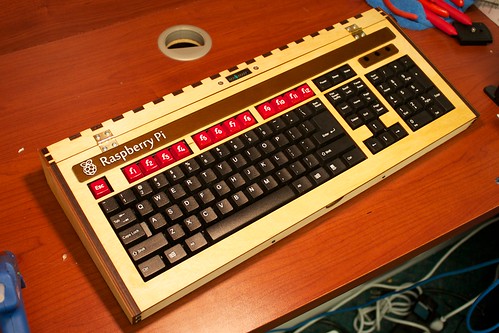
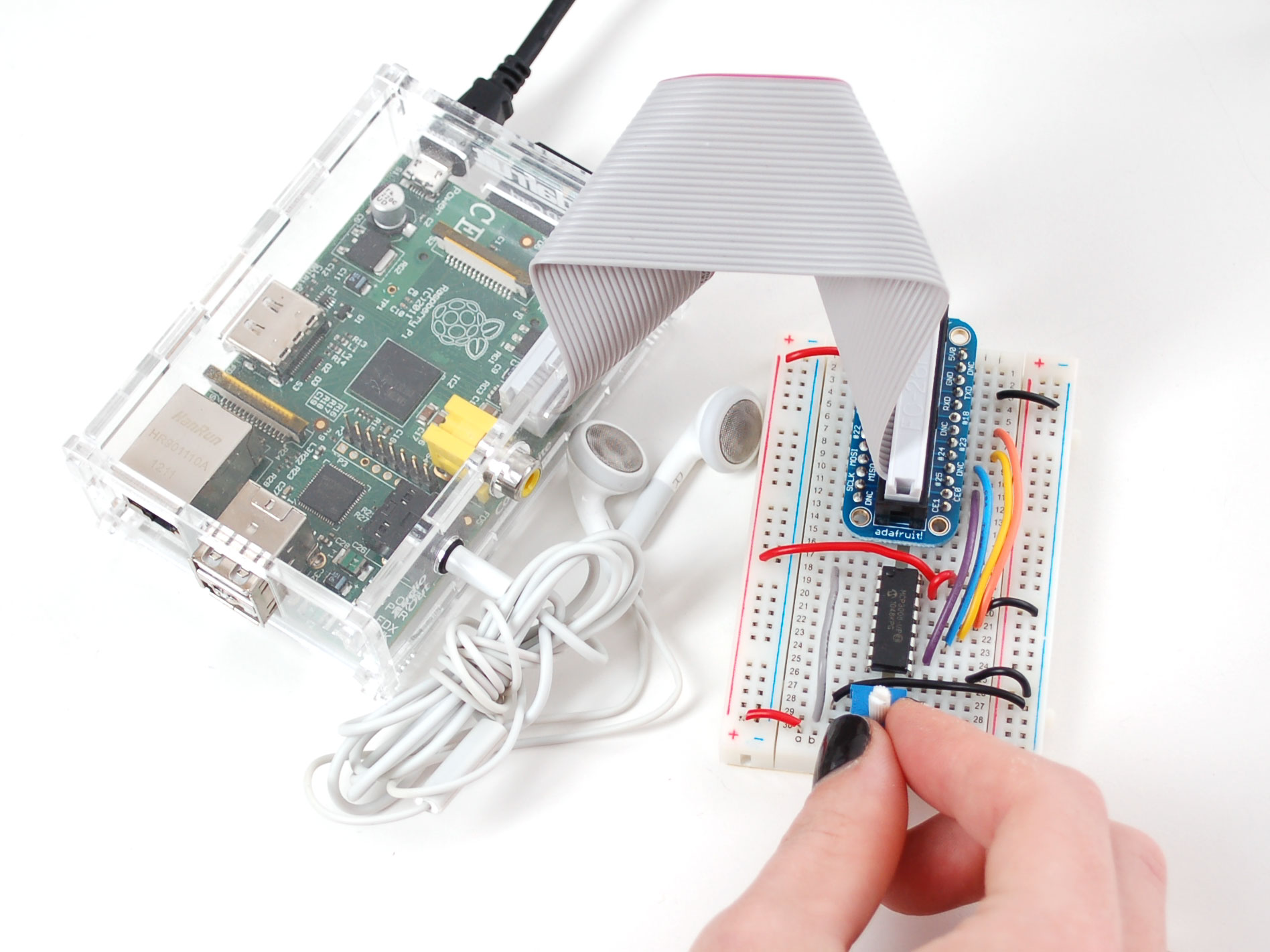
And now for your viewing pleasure, assorted Raspberry Pi pr0n:
 

Thursday, September 27, 2012

Cool new 3D printers

I don't want to fall into the habit of only blogging once per year about MakerFaire. So this post is actually about a crop of cool new 3D printers, and I'll probably see a few of them there, but it's not about MakerFaire proper. These all fall in the $1500 to $2500 price range.


First up is Makerbot's Replicator 2. There is some controversy around this one, because it's a mix of open source technology under the GPL, and some new technology that's very likely not open source, which allows for a much higher print quality. The open source 3D printer advocates are concerned that it violates the GNU General Public License. The open source technology is primarily the work of Adrian Bowyer who started the RepRap project, and he's given (unenthusiastic) permission to Makerbot to use it.

One of the RepRap enthusiasts is my friend Jeff, who will have a table at MakerFaire this year to show off the printer that has occupied two or three years of his nights and weekends. I like Jeff and I think he'll probably not be too happy with Makerbot's decision to include closed-source technology. But the step up in quality for the price is pretty appealing for a non-GPL-purist like myself. I don't worry about running GPL software on closed-source laptops, after all.

Second is the FORM1 from some Media Lab folks. I don't know much about these folks or their history, but the Media Lab has been at the cutting edge of high-end 3D printing for a couple of decades now, so they've probably got something pretty interesting. I think their raw material is a liquid rather than the long plastic spaghetti sticks used by most other affordable machines (based on one photo on their Kickstarter page). This is the most expensive of the lot, price currently listing as $2500.

Third is the UP!Plus from 3D Printing Systems. Their output doesn't look as nice as the Replicator 2 or the FORM1, but they are at the more affordable end.


What's cool about all these printers and some other new ones is that the user friendliness and quality of output are improving rapidly in recent years. Before long, these things will be popping up in homes, dorm rooms, high schools, and the local mall.

Makerfaire NYC 2012 is this weekend, and I'll be there to checkout 3D printers, microcontroller boards, art installations, and whatever else is around, and I'll blog about what I see.

Monday, September 19, 2011

MakerFaire NYC 2011

I went to MakerFaire at the NY Hall of Science, Queens, NY on September 17th and 18th, and took plenty of photos. Like last year, the location was the site of the 1964 World's Fair. Even though I grew up pretty close to New York, I didn't get to see the World's Fair as a child, so I'm glad to have these opportunities to see what's left of it.
As was true last year, there were lots of 3D printers and CNC milling machines. My impression this year was that a much larger percentage of them were hobbyist efforts rather than high-end commercial projects. I think that's a good thing. There seems to me to be a maturing of the 3D printer hobbyist effort in general, and the gradual emergence of more small businesses like Bre Pettis's Makerbot. The hard technical challenges (the big one being getting the extruder nozzle to work just right) have pretty much been identified now.

As I looked at some of the products, which have been improving in resolution, it occurred to me that an interesting approach would be, instead of going with increasingly fine nozzles, to use a coarse nozzle to place a slightly oversized drop of plastic, let that drop cool and harden, and then bring in a milling tool to shape it. This would mean moving back and forth frequently between the extruder nozzle and the milling tool, so it would need some tinkering and might not end up being an improvement.

There were lots of other tools, things on display, and cool stuff to see. I was really impressed with an elegant (if low-res) volumetric display called Lumarca. Essentially the guy uses a projector to project colors onto lengths of monofilament fishing line in the viewing volume, and by carefully controlling the projected image, he individually controls what colors appear along each length of monofilament.

There were a few interesting vehicles, like motorized skateboards and a Segway clone. Those were fun.

One thing I found interesting was that in addition to the expected Arduino stuff (which has the full weight of O'Reilly Publishing behind it), there were a good number of boards with more advanced microcontrollers, particularly ARM Cortex-M3 controllers. This interests me because with their larger address spaces and fuller feature sets, ARM processors can run Linux OSes or Python interpreters or other big pieces of code  beyond the itty-bitty programs that will fit on an Arduino. Teho Labs had a nice line of Cortex M3 boards. They shared space with Dangerous Prototypes who were showing off their Web Platform board.

I did get pretty tired and sore walking around so much, and needed some Advil. But it was definitely worthwhile. Maybe I'll have some project next year so that I can have a booth of my own.http://www.arm.com/products/processors/cortex-m/cortex-m3.php

Sunday, September 11, 2011

We need to build more educational computers

When I was a kid, I had this absolutely wonderful educational computer called Digi-Comp. It was very simple, with only three bits of state, and that was fine for learning an awful lot of basic stuff about computers. And it was sturdy as anything. I must have disassembled and reassembled it hundreds of times and it never broke and never stopped working. Somebody needs to design a 21st century mechanical computer using an inexpensive service like Ponoko or Shapeways or 100kGarages or Big Blue Saw to do laser cutting or 3D printing.

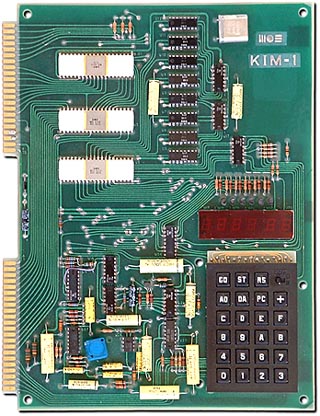
When I was in college, I saved up money to buy a KIM-1 single-board computer with a 6502 microprocessor, a hexadecimal keypad, and six seven-segment digit displays. I learned a lot of what became my career playing with that thing, writing little assembly language programs, soldering TTL chips to it, and generally having a great time. When I left school, I bought an old ASR-33 teletype from the school's department for retiring obsolete junk, and used it to give the KIM-1 a 300 baud line printer. Back in those days we had extraordinarily low thresholds of entertainment. Still, it was educational.

We need to be building more of this kind of stuff today. The things we build need to be easily hackable and easy to form user communities around. I guess you could say we already have something like the KIM-1 with today's Arduino, but it never fills me with intrigue like the KIM-1 did, where you were literally typing in machine opcodes onto that hex keypad, and they're showing up in the LED digits. It gives you a real sense of intimacy with the entire process of computation. Compiling C code never gets you quite that close to the action.

If you regard the Digi-Comp and the KIM-1 as two points along a spectrum of sophistication, we probably ought to plan on a third more advanced point, given that the KIM-1 is about 30 years old now. I've been doing some puttering with ARM-7 and ARM-9 boards of various kinds, some so capable as to run Linux, and I think that's a good third point because that's the kind of hardware that appears in modern consumer devices.

Friday, August 26, 2011

Random notes for 26 August 2011

I don't have anything individually notable happening lately but I thought I'd talk about a few different things. Yesterday lunchtime I talked to some folks at Harvard Medical School who are cooking up a great little open source project, and I'm hoping to contribute to it. Their idea is to use Blender to make it simple and easy and quick for medical researchers to put together animations involving multiple proteins interacting. How things have been so far is that making an animation is a colossal hassle (I know this from experience) and usually the researcher is way too busy doing science, so any animation would be done by public relations folks as a means to communicate the research to the non-scientific public.

If animation were so quick and easy and painless that the researcher could do it himself or herself, then researchers could share animations with one another, modify another researcher's animation, append commentary or publication references or other metadata (I am envisioning something like a git repository with forks), and animations would become more than just a PR tool. They would become a part of the active scientific literature, and they would make it possible for researchers to dig deeper into problems, to have more detailed and nuanced communications with one another, and ultimately for better science to be done.

They've decided to attack the problem of simulating and animating several proteins (or other similar sized structures like cell membranes) interacting simultaneously. Most software tools in this area are designed to deal with only one large molecule at a time. But disease processes often involve interactions. Think about viral self-assembly where a bunch of pieces come together to form a protein shell around some RNA. Think about ligands binding with receptors. These involve two or more large molecules, and you need to keep track of their position, their orientation, their mechanical properties, their electrostatic properties, their relative linear and angular momenta. It's a yummy area of inquiry, and done correctly, this could be a significant advance to science, in an area that might easily be dismissed as "pretty pictures".

So yeah, I'm pretty psyched about their project. But there is other news. I'm saddened to learn that Steve Jobs is stepping down as Apple's CEO, presumably for health reasons. It's a sad sad thing that we don't have a better handle on cancer, AIDS and other big diseases. As an engineer in a society that considers itself advanced, I find it a little embarrassing that we've done so poorly. I'm also embarrassed that our economy distorts the motivations for dealing with these -- pharmaceutical companies make bigger profits "treating" diseases than curing them. And don't get me started with medical insurance, or the FDA approval process.

On to happier topics. At my job we are starting to use Flask for some things, which is a sort of simplified Django. Neat stuff. And we're tinkering with Mongo and Redis, both of them fascinating NoSQL databases. Very very cool. I need to think of some interesting home projects for these.

Sunday, July 31, 2011

Molecule construction and visualization website

For a couple of months now, I've been at work on a website for constructing and visualizing molecules. In-browser molecular dynamics are done with a molecular mechanics modeler based on Norman Allinger's MM2 as described in Eric Drexler's Nanosystems. This is the same set of mathematics I used in an earlier effort in the same vein called NanoCAD in 1997. Unfortunately my knowledge of chemistry and molecular modeling hasn't grown very quickly in that time. I know a bit more from my time with Nanorex, where molecular modeling was mixed with gadgets to supply external forces ("jigs" in the parlance of our program), an idea that I believe is crucial to nanotechnology design software and also to scaling molecular simulations to much larger scales. I hope to use the code from this website as a starting point for working in that area.

I have expenses like everybody else, and I'm trying to think of ways to use this website to make a little money without tarnishing its educational potential or scientific credibility. I want the website to be readily available for use in schools and universities. If I end up putting ads on the website, I hope to make them tastefully small and out-of-the-way. I've noticed that the HTML5 canvas I'm relying upon for graphics doesn't work on iPhones, iPads, or Android phones, so there's an opportunity to sell mobile apps for those platforms, using their native graphics canvases. I'm very open to ideas to bring in a little revenue without being tacky. I've put a lot of work into this, and plan a lot more.

Longer term plans include adding jigs as discussed above, maybe an interface for a force-feedback joystick so that you can find out what Brownian motion feels like, using the website to get access to much better and faster simulators, and storing your own private library of molecules. This stuff started out as Java code with the website's JavaScript being co-developed, but at some point the JavaScript development took off and I didn't make time to keep the Java up to date. So I need to do that, and then the JAR file can become a useful computational chemistry tool.

Tuesday, July 26, 2011

Molecular dynamics and force fields

In the web's early days, I wrote a Java applet to do a little bit of molecular modeling in your web browser. I had picked up a copy of Eric Drexler's book Nanosystems, read the section on MM2, and understood it well enough to implement it in code. That was a lot of fun to work on, and as I've watched web technology progress, I've occasionally thought about taking another stab at it. I am now in the process of doing that, as some parts have gotten easier, others have gotten faster, and some have gotten just plain interesting. JavaScript, despite a few warts, is charming, and widespread deployment of HTML5 is a big help too.

Molecular modeling approaches like MM2 generally work by computing potential energy as a function of the relative positions of atoms within a molecule. This is done by decomposing the potential energy into a series of terms, relating to the lengths of chemical bonds, the angles between bonds that share a single atom, or the dihedral angle between two bonds linked by a third bond. These terms are parameterized based on the elements and hybridizations of the atoms involved. Force contributions of these terms can be computed independently and summed together to find the forces acting on each of the atoms. This is necessarily a simplification, and more accurate approaches exist involving solutions to the Schrodinger wave equation describing probabilistic locations of electrons and nuclei. But the simple mechanical approach is adequate for getting a sense of the molecule's general shape and how it perturbs over familiar temperature ranges.

For a potential energy function E(p) relating to some geometric parameter p, we can use the chain rule to get the force on an atom at position (x,y,z):
(fx, fy, fz) = -E'(p) (∂p/∂x, ∂p/∂y, ∂p/∂z)
where ∂p/∂x is the notation for the partial derivative of p in the x direction. The forms of the potential energy functions are pretty straightforward (1, 2), and taking their derivatives is not difficult. The remaining trick is to determine the partial derivatives of parameters with respect to x, y, and z. Let's consider a simple case where the parameter is the distance between two atoms at positions (ux, uy, uz) and (vx, vy, vz). Then the distance is r where
r2 = (ux - vx)2 + (uy - vy)2 + (uz - vz)2
and taking partial differentials with respect to ux yields
2r ∂r = 2 (ux - vx) ∂ux

∂r/∂ux = (ux - vx) / r
The same operations with uy and uz tell us that the force vector acting on the first atom is f = -E'(r) r / r where the direction of r is from the v atom to the u atom, and the inverse for the second atom. Here, boldface denotes a vector quantity.

It's usually easy to apply some geometric intuition and determine a unit vector in the direction of greatest change for a parameter p (the gradient of p with respect to a particular atom's position). For an angle θ involving three atoms at positions u, v and w, with v being the vertex, the gradient for u lies in the plane and is perpendicular to (u - v), pointing away from the third atom. Then the vector (∂θ/∂x, ∂θ/∂y, ∂θ/∂z) is in the same direction as the gradient unit vector, and it's necessary only to determine a scaling factor. That can be obtained by doing a little trigonometry to determine that a teeny move of distance δ in that direction will produce a parameter change dθ, and then the magnitude of the force is -E'(θ) dθ/δ.

Sunday, June 19, 2011

Thinking about going solar

I answered an ad by an outfit called One Block Off the Grid (1BOG) which organizes the installation of solar panels on people's roofs. When I say "organize", I mean not only that they take care of various complex logistical issues including lining up a NABCEP-certified installer, but also that they try to consolidate system purchases to bring costs down. Over the past couple of years this has become big business in the U.S. because of state and federal government incentives encouraging installation.

The 1BOG folks sent me a proposal with numbers in it, and I have 30 days to make a decision during which the proposed price is guaranteed. I also spoke briefly with SolarFlair, a similar outfit here in my town, that does the same sort of purchase consolidation and does the installation themselves. Since my 30 days is nearly expired, I'm hoping to drop into the SolarFlair office some time this week and talk numbers with them.

In my own state of Massachusetts, the situation is that people with solar panels produce SRECs (wikipedia, explanatory video) worth around $500 each time the solar panels produce a megawatt-hour.
Massachusetts' renewables portfolio standard (RPS) requires each regulated electricity supplier/provider serving retail customers in the state to include in the electricity it sells 15% qualifying renewables by December 31, 2020... Solar Renewable Energy Certificates (SRECs) represent the renewable attributes of solar generation, bundled in minimum denominations of one megawatt-hour (MWh) of production. Massachusetts' Solar Carve-Out provides a means for SRECs to be created and verified, and allows electric suppliers to buy these certificates in order to meet their solar RPS requirements. All electric suppliers must use SRECs to demonstrate compliance with the RPS. The price of SRECs is determined primarily by market availability, although the DOER has created a certain amount of market stability by establishing a state Solar Credit Clearinghouse Auction (where prices are fixed at $300/MWh), as well as the Solar Alternative Compliance Payment (SACP) for the state RPS (set at $550/MWh for 2011). The Solar Credit Clearinghouse will only be utilized if or when SREC generators cannot sell their SRECs on the open market; the fixed price of $300/MWh effectively acts as price floor. The SACP, on the other hand acts, acts as a ceiling on the value of SRECs because it is the per-MWh payment that electricity suppliers must make if they fail to obtain enough SRECs to cover their RPS obligation.
There is a federal tax credit of 30% on the cost of installation. I don't know if that's factored into the prices I've been quoted, and maybe I'd need to pay that myself upfront until I get the following year's federal tax rebate.

The 1BOG proposal offers options either to lease the system from 1BOG, or to pay for it outright at a cost of about $25K. I went to the credit union and applied for a 5-year fixed rate $25K home equity loan, with monthly payments of about $450. 1BOG proposes a system to create about 5.5 kW peak, and they are guessing that averages out to about 700 watts continuous, which is about 6 megawatts per year, for a yearly SREC income of $3200. The systems saves me about $100 per month on the electric bill, and when all the dust settles, my monthly expense is about the same as it is currently.

Five years later, the loan is paid off, the solar panels are my property free and clear, SREC income is reduced but not zero, and my electric bill is still substantially reduced or absent. And I will have set a good example for friends and neighbors that one can reduce one's carbon footprint without unreasonable financial hardship.

Monday, June 13, 2011

A somewhat half-baked embedded OS idea

I mentioned in my previous post that I had spent some time porting FreeRTOS to the SAM7 architecture before realizing my purpose was better served by looking for an existing port. But in the process I gave some thought to what kind of alternative to FreeRTOS I might cook up, if somehow the porting exercise didn't go well. I haven't thought through every detail completely, and I wouldn't trust myself to anticipate every issue until I'd actually coded the thing, which I haven't yet. My sketchy design is based on two ideas.

An aspect of JavaScript that fascinates me is that everything runs in a single thread (an idea nicely described here). Each function is the sole owner of the processor (at least as concerns the JavaScript world) until it completes, and there will be no unexpected modification of variables or data structures. No locks or mutexes or semaphores or "synchronized" keywords, no threading headaches. The price of this simplicity is that functions often are event handlers and must be written to do their work quickly and get out of the way so other events can be handled.

The second idea is something I've seen when coding applications for both Android and iOS. Communication between threads is carefully controlled. Slow operations are begun by event handlers in a UI thread, and when the work is done, another handler runs in the UI thread, supplied with any relevant results from the slow operation. Within the handler thread, JavaScript's protocol of running only one handler at a time to completion is observed. Where in Android one would invoke a Runnable object using a View.post() call, I would be inclined to create a postEvent(event,arg) function since I'd plan on doing things in C, and where presumably "arg" is pointing to a struct containing whatever information needs to be retrieved from the slow operation. That way, there is never a point in time where the slow operation and the completion handler are running concurrently, and again there is no need for arbitration of data access.

Flinging structs around requires malloc and free. That worries me a little because fragmentation, memory leaks, and low memory are all likely to be more troublesome on an embedded microcontroller than a desktop computer, and I'm not a memory allocation guru. Maybe there's some way to avoid memory allocation altogether, or maybe it will be less of a problem than I fear.

The general idea would be to implement a single handler thread and a fixed pool of worker threads. Worker threads idle until assigned a task; a handler can post a task to the worker thread pool where it will be picked up as soon as a worker thread is available. There might be an event fired when the number of available worker threads went from zero to non-zero; I haven't decided yet whether that's useful.

There would be events for various hardware stimuli: pushbuttons pressed, UART character received, Ethernet byte received, timer gone off, things like that. There would also be user-definable events which would include task completions. There would be some simple way to associate handler functions with events.

That's basically as far as I've gotten with it. Obviously there's a good deal left to do, and I won't really feel good about it until I see it doing something interesting and useful on a real microcontroller.

Of microcontrollers and operating systems

In recent weeks I've put some effort into working with a Beagleboard running Angstom Linux. The Beagleboard has an OMAP3530 processor, a ridiculously over-powered thing. It's cool to be running Linux on something you can attack with a soldering iron. But as I looked at my intended application and the price of the Beagleboard, and the hoops they jump through to manufacture the Beagleboard, I started to wonder if more conventional weapons might be sufficient to win the day.

I'd blogged in the past about the AT91SAM7, another family of ARM-based chips that are a little less over-powered, so I wondered, would they work for this? My first thought was to use Angstrom Linux on the SAM7. I found that nobody had done it, and digging deeper to find out why they hadn't, I was reminded that Linux requires a MMU and the SAM7 doesn't have one. Neither of these was a surprising piece of information, and I was probably dimly aware of both, but had never consciously connected them.

The reason Linux needs an MMU is because it runs multiple processes in separate memory spaces, so that one process can't crash another by overwriting its memory. This requires remapping from virtual memory addresses to physical addresses. That's most of what an MMU does.

It's shameful to admit, but I had unthinkingly assumed that 32-bit processors would necessarily run something like Linux, merely by virtue of being 32-bit processors. This was the result of having grown up with 8-bit processors and thinking of 32-bit processors as "big" and "complicated" and a little "scary". They are in fact all those things, but we still need to keep our wits in their presence.

Casting about for an operating system that might be more SAM7-friendly, I came across FreeRTOS. I started puttering around with a FreeRTOS port for the SAM7, and after banging on that a while it crossed my mind to think that there might be some other ARM7 chip for which a FreeRTOS port already existed so I wouldn't have to do the port myself. A little investigation in this direction led me to the LPC1768 (overview, datasheet, user's manual, Digikey listing) an inexpensive ARM7 chip with lots of flash and RAM, an Ethernet controller, USB controllers for both host mode and device mode, buckets and buckets of GPIO pins, and a comfortably higher number of MIPS than the SAM7 family. The LPC1768 has an ARM Cortex M3 core (overview, user's guide).

So what are our hardware development options here? Sparkfun provides a nice little board for only $50. It has tons of pins, sanely spaced at 0.1", and a JTAG connector on one end and a mini-USB on the other. It does require a power supply but that's not unreasonable. It has two pushbuttons (one a reset) and an LED. While I heartily encourage anybody to buy this board, I ended up buying a different board (which, time will tell, I may regret) because it was available on eBay.

I'm hoping to see the board in about a week, and I'll try to get FreeRTOS running on it with reasonable haste. Hopefully it will all work out nicely and I'll get to do a lot of blogging about it. The LPC1768 is really an interesting chip with a lot of on-chip peripherals, and I'd expect that would be a good amount of fun.

Friday, May 06, 2011

Beagleboard, OMAP, and Angstrom

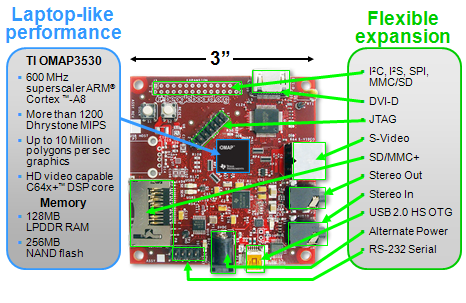
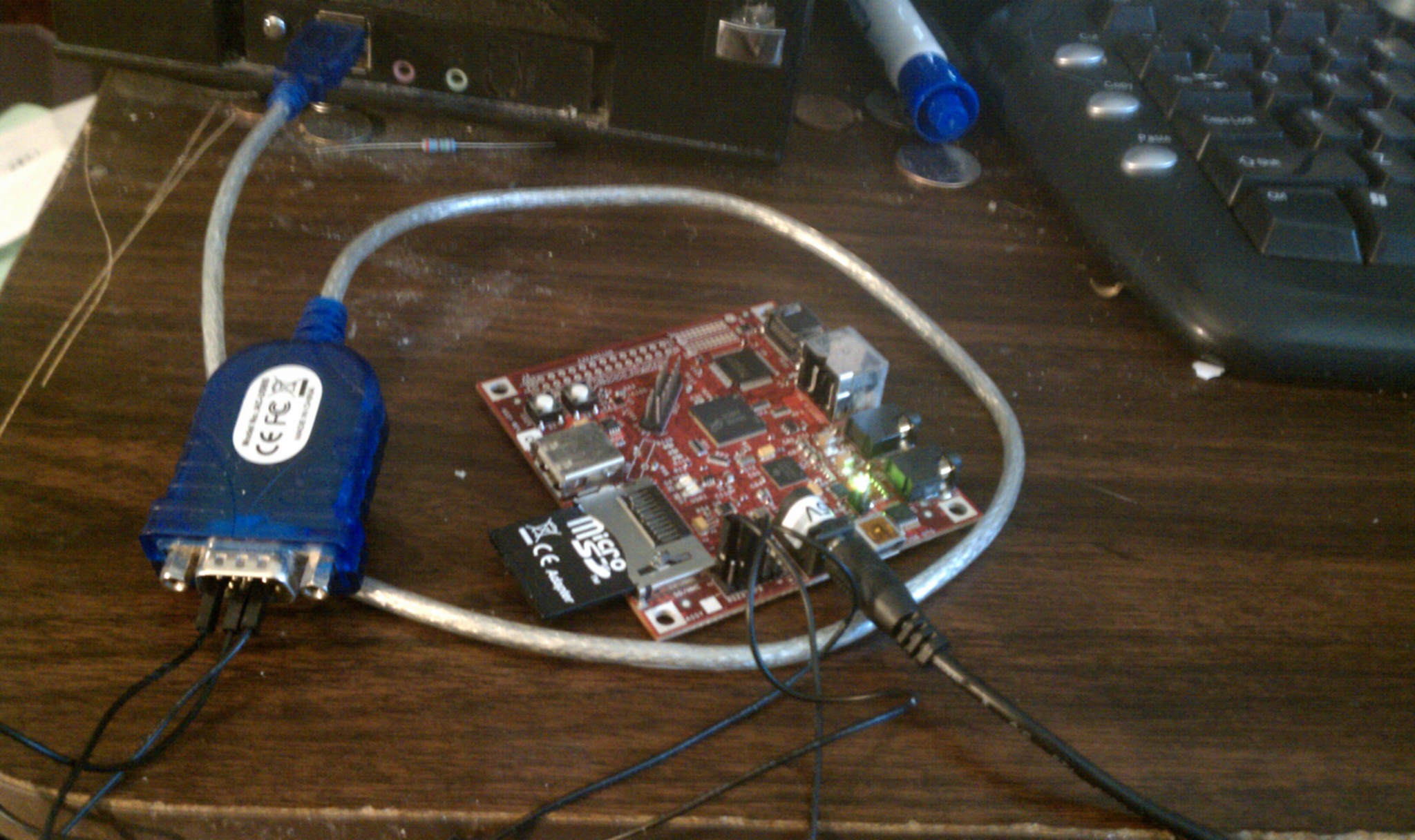
I've been doing a lot lately at work with the BeagleBoard, shown at right. It uses an OMAP processor from Texas Instruments. The OMAP family is ARM-based and includes a DSP core, along with an intimidatingly rich set of on-chip peripherals. The OMAP is built with a package-on-package arrangement so that the RAM die sits right on top of the processor die.

The board typically costs about $150 in the United States. You'll need a few things to work with it: an SD card, a USB adapter to write the SD card, a USB-to-serial adapter to communicate with the board, a 5-volt power supply, and later (maybe sooner) you'll want a USB hub with a RJ-45 ethernet jack.

A minimal setup is shown at right. This is just enough to connect to the board over a serial port (115.2 kbaud, 8N1, no flow control) and verify that you get a working Linux shell. The Angstrom Linux distribution has a bit of a learning curve but it seems well thought out.

I'm thinking of trying Angstrom on one of the AT91SAM7S boards from Sparkfun when I get a little spare time. I think that would work, and it would really rock to see full-blown Linux running on a $36 board. I don't know how I'd handle networking in that kind of situation, though.

Update: I am reminded that the SAM7S lacks an MMU so it can't run Angstrom. There is a different Linux distribution called uCLinux (see uclinux.org) that would work, maybe I'll try that some day.

Friday, April 22, 2011

Chinese government hackers may be attacking Amazon's cloud service?

A friend recently received the following email from the website Change.org which is posting a petition for the release of artist Ai Weiwei, a critic of some of the policies of the Chinese government. In about the last 24 hours there have been a lot of attacks on Amazon's EC2 cloud service, bringing down Change.org and a lot of other unrelated websites. There is conjecture that these attacks are from hackers working for the Chinese government. Here's the email my friend received:
Dear [friend of Will],

The petition demanding the release of Chinese artist Ai Weiwei has nearly 100,000 signatures.

Here's how we know it's really gotten Beijing’s attention: For the past three days, the Change.org website has been repeatedly targeted by cyber attacks coming from China that aim to bring our site down, which would keep people from signing this petition.

Our engineers are working around the clock to fend off the attacks and, for now, the petition is still up.

We need to let the Chinese government know that illegal tactics from within its borders won't stop the mounting pressure on it to release Weiwei. If you haven't already, please join nearly 100,000 Change.org members and add your name to the petition now:

http://www.change.org/petitions/call-for-the-release-of-ai-weiwei?alert_id=dpdNHjKNRO_RlLWixieHN&utm_source=action_alert&utm_medium=email

To recap: Acclaimed dissident artist Ai Weiwei -- who helped design the famed “Bird’s Nest” stadium for China’s Olympics -- was arrested on April 3rd by Chinese security forces at the Beijing airport. His office and studio have been ransacked, and no one has heard from him since.

The international art community banded together, demanding his release -- and the directors of more than twenty leading museums (including the Tate Modern, Museum of Modern Art, and the Guggenheim) started a petition on Change.org that has garnered worldwide attention, including in the New York Times, LA Times, and Guardian.

The campaign has helped to give rise to an international outcry. Political leaders around the world are calling for Weiwei's release and activists have organized peaceful protests at Chinese embassies and consulates.

Though China is desperate to silence its critics, the pressure to free Weiwei continues to grow. You can help by signing the petition now:

http://www.change.org/petitions/call-for-the-release-of-ai-weiwei?alert_id=dpdNHjKNRO_RlLWixieHN&utm_source=action_alert&utm_medium=email

Autocratic governments know that the internet is a democratizing force, and they'll do everything they can to suppress online activism. Know that we stand with you for change, and that we will continue to fight to make sure your voice can be heard.

- Patrick and the Change.org team

P.S. Due to these repeated attacks, our site may be slower than usual or unavailable at times over the next few days. Thanks for your patience.
If it's true that the EC2 outage is the work of Chinese government hackers, it's a little scary. It means they are capable (like Al Qaeda) of attacking assets on American soil.

It might have been a stupid move, becuase they inconvenienced some of the better-funded Internet companies in America, which have access to some of the best online forensics experts in the world, so there's a good chance the hackers will be identified. Maybe future attacks of this sort can be prevented.

Interesting times. We can only hope that Ai Weiwei is free soon and able to speak freely.