Showing posts with label software. Show all posts

Tuesday, April 15, 2014

Espruino: JavaScript for embedded devices

My last post was really written primarily as background for this post. TL;DR: there is a lot we're doing right nowadays as software engineers, that we were screwing up badly 20 to 30 years ago.

I am moved to write this post because I've been playing with the Espruino board (having pre-ordered one during the Kickstarter campaign), which runs JavaScript close to the metal on an ARM processor.

JavaScript is a cool language because it draws upon a lot of the experience that engineers have gained over decades. Concurrent programming is hard, so JavaScript has a bullet-proof concurrency model. Every function runs undisturbed to completion, and communication is done by shared-nothing message passing. In the browser, JavaScript gracefully handles external events with unpredictable timing. That skill set is exactly what is required for embedded hardware control.

Crockford once referred to JavaScript as "Scheme with C syntax". JavaScript has many of the features that distinguish Lisp and its derivatives, and which set apart Lisp as probably the most forward-looking language ever designed.

This video is Gordon Williams, the creator of the Espruino board, speaking at a NodeJS conference in the UK. One of the great things he did was to write code that can run on several different boards. I'm particularly interested in installing it on the STM32F4 Discovery board because it costs very little and looks pretty powerful as ARM microcontrollers go. There is a Youtube playlist that includes these videos and others relating to the Espruino board.

A few decades' progress in computers and electronics

I got my bachelors degree in EE in 1981 and went to work doing board-level design. Most circuit assembly was wire-wrap back then, and we had TTL and CMOS and 8-bit microcontrollers. Most of the part numbers I remember from my early career are still available at places like Digikey. The job of programming the microcontroller or microprocessor on a board frequently fell to the hardware designer. In some ways it was a wonderful time to be an engineer. Systems were trivially simple by modern standards, but they were mysterious to most people so you felt like a genius to be involved with them at all.

After about 15 years of hardware engineering with bits of software development on an as-needed basis, I moved into software engineering. The change was challenging but I intuited that the years to come would see huge innovation in software engineering, and I wanted to be there to see it.

Around that time, the web was a pretty recent phenomenon. People were learning to write static HTML pages and CGI scripts in Perl. One of my big hobby projects around that time was a Java applet. Some people talked about CGI scripts that talked to databases. When you wanted to search the web, you used Alta Vista. At one point I purchased a thick book of the websites known to exist at the time, I kid you not. Since many websites were run by individuals as hobbies, the typical lifespan of any given website was short.

Software development in the 80s and 90s was pretty hit-or-miss. Development schedules were almost completely unpredictable. Bugs were hard to diagnose. The worst bugs were the intermittent ones, things that usually worked but still failed often enough to be unacceptable. Reproducing bugs was tedious, and more than once I remember setting up logging systems to collect data about a failure that occurred during an overnight run. Some of the most annoying bugs involved race conditions and other concurrency issues.

Things are very different now. I've been fortunate to see an insane amount of improvement. These improvements are not accidents or mysteries. They are the results of hard work by thousands of engineers over many years. With several years of hindsight, I can detail with some confidence what we're doing right today that we did wrong in the past.

One simple thing is that we have an enormous body of open source code to draw upon, kernels and web servers and compilers and languages and applications for all kinds of tasks. These can be studied by students everywhere, and anybody can review and improve the code, and with rare exceptions they can be freely used by businesses. Vast new areas of territory open up every few years and are turned to profitable development.

In terms of concurrent programming, we've accumulated a huge amount of wisdom and experience. We know now what patterns work and what patterns fail, and when I forget, I can do a search on Stackoverflow or Google to remind myself. And we now embed that experience into the design of our languages, for instance, message queues as inter-thread communication in JavaScript.

Testing and QA is an area of huge progress over the last 20 years. Ad hoc random manual tests, usually written as an afterthought by the developer, were the norm when I began my career, and many managers frowned upon "excessive" testing that we would now consider barely adequate. Now we have solid widespread expertise about how to write and manage bug reports and organize workflows to resolve them. We have test-driven development and test automation and unit testing and continuous integration. If I check in bad code today, I break the build, suffer a bit of public humiliation, and fix it quickly so my co-workers can get on with their work.

I miss the simplicity of the past, and the feeling of membership in a priesthood, but it's still better to work in a field that can have a real positive impact on human life. In today's work environment that impact is enormously more feasible.

Wednesday, December 11, 2013

ZeroMQ solves important problems

ZeroMQ solves big problems in concurrent programming. It does this by ensuring that state is never shared between threads/processes, and the way it ensures that is by passing messages through queues dressed up as POSIX sockets. You can download ZeroMQ here.

The trouble with concurrency arises when state or resources are shared between multiple execution threads. Even if the shared state is only a single bit, you immediately run into the test-and-set problem. As more state is shared, a profusion of locks grows exponentially. This business of using locks to identify critical sections of code and protect resources has a vast computer science literature, which tells you that it's a hard problem.

Attempted solutions to this problem have included locks, monitors, semaphores, and mutexes. Languages (like Python or Java) have assumed the responsibility of packaging these constructs. But if you've actually attempted to write multithreaded programs, you've seen the nightmare it can be. These things don't scale to more than a few threads, and the human mind is unable to consider all the possible failure modes that can arise.

Perhaps the sanest way to handle concurrency is via shared-nothing message passing. The fact that no state is shared means that we can forget about locks. Threads communicate via queues, and it's not so difficult to build a system of queues that hide their mechanics from the threads that use them. This is exactly what ZeroMQ does, providing bindings for C, Java, Python, and dozens of other languages.

For decades now, programming languages have attempted to provide concurrency libraries with various strengths and weaknesses. Perhaps concurrency should have been identified as a language-neutral concern long ago. If that's the case, then the mere existence of ZeroMQ is progress.

Here are some ZeroMQ working examples. There's also a nice guide online, also available in book form from Amazon and O'Reilly.

Saturday, February 02, 2013

Ruby and Rails and all that stuff

At the suggestion of a recruiter, I'm learning Ruby on Rails this weekend. I was active on the comp.lang.python mailing list when Matz came around talking about Ruby. It seemed like a good thing, but I mostly ignored Ruby for years because it seemed to be solving problems that I already had solutions for with Python. Likewise, Rails seemed to retread the same ground already covered by Django.

Motivated to take another look because of the wild popularity of Rails, I see there's something in Ruby that deserves attention, which is blocks (anonymous closures, or what Lispers would call lambda expressions). They function as closures, and any language that makes a closure a first-class object is a good language. There are a ton of good Ruby tutorials. I myself am partial to Ruby in Twenty Minutes. There are also a good Rails tutorial (and I'm sure there are several others). Another notable thing in the Ruby community is RDoc, an unusually good documentation tool.

I'll be installing Ruby and Rails on an Ubuntu 12.04 machine. I don't like how old the packages are in the official Ubuntu repository, so I'll install from Ruby websites instead. The first thing to do is install RVM with these two commands:
$ curl -L https://get.rvm.io | bash -s stable --ruby
$ source /home/wware/.rvm/scripts/rvm
Later I reversed my decision about the official repositories, when I discovered I could install "ruby1.9.3". What RVM offers is an ability to run multiple Ruby environments on the same machine, like Python's virtualenv.

So now Ruby is installed and you can type "irb" to begin an interactive Ruby session. Next install Rails, and some additional things you'll need soon:
$ gem install -V rails
$ sudo apt-get install libsqlite3-dev nodejs nodejs-dev
Now you can jump to step 3.2 of the Rails tutorial and you should be good to go. Or you can go to the Github repository (README) which I cloned from the railsforzombies.org folks, and that's where I'm going to be tinkering for a while.

When debugging Rails controller code, you'll want to uncomment "gem debugger" in Gemfile, insert "debugger" into your code, and then reload the page in your browser, and it will stop the development server and put you into an interactive shell with all the variables available in mid-process. You'll also have GDB commands like "step", "next", "continue", and breakpoints.

When you're ready to deploy, consider Heroku, a Rails hosting service that lets you use one virtual machine for free. I've deployed my Zombie Twitter app there, and after a few initial bumps, things have gone pretty smoothly.

Here's a custom search for Ruby and Rails:

Sunday, November 18, 2012

Setting up an RDF server in VirtualBox, part 1

VirtualBox is an open-source virtual machine that you can use on Windows, Mac OSX, or Linux to run one of the other operating systems. Here I'll be using VBox on an Ubuntu Linux desktop machine to set up an Ubuntu server machine. The point in doing that when the two operating systems are so similar is to keep the two environments separate, and to discover what I'll need when I move the server to a VPS.

I'm doing this on a laptop with a 160 gig partition with Ubuntu 10.04 desktop. I can comfortably dedicate 20 gig to the virtual hard disk image. The VM will run Ubuntu 12.04 server. No shared folders because they won't be available on the VPS.

Make sure you have a good fast Internet connection for the Ubuntu desktop machine, and download the Ubuntu server ISO. It's available as 32-bit or 64-bit. If you're not sure about your CPU, you're probably better off with 32-bit. Set up VirtualBox:
$ sudo apt-get install virtualbox-ose

Now you'll find "VirtualBox OSE" in the Applications->Accessories menu in the upper left of the screen. Click on that, and when the window comes up, click on the light blue "New" icon. Pick a machine name, and Linux/Ubuntu as the virtual machine type, and give yourself a decent amount of RAM and hard disk space. It's nice to start the hard drive with 20 or 30 gig if you can spare it. Once the VM is created, go into settings for it, click "Storage" and click the third line with the CDROM icon. To the right of "CD/DVD device" click the yellow folder icon and navigate to the Ubuntu server ISO that you downloaded earlier. Set "Network" to the "Bridged adapter" option. Under shared folders, add your home directory (read only) and give it a name you'll remember. Now it's time to start the VM and install Ubuntu server on the virtual hard disk you've created. Before I could do this on my laptop, I found I needed to go into Settings->System->CPU and enable PAE.

During the installation process, you'll be asked what kinds of servers you want to run. Select "OpenSSH server" (so you can ssh/scp into the VM) and "LAMP server" (to get Apache and MySQL) and "Tomcat Java server" (to pick up a bunch of Java stuff you'll want for Jena). If you select an empty password for the root user on MySQL, you'll need to enter it multiple times, so you may want to select something almost as trivial like "root". You don't need to worry too much about security with a VM that will only be reachable on the local subnet.

When the installation is done, the machine will reboot, and the VM window will close and re-open. Go to the "Devices" menu at the top and under "CD/DVD devices", unclick the Ubuntu server ISO.

On to Jena. Looks like there is some good advice here, but some of it is dated so I'm tweaking it a bit: http://ricroberts.com/articles/installing-jena-and-joseki-on-os-x-or-linux

Log into the virtual machine and type:
$ sudo su -
# chmod 777 /opt
# exit
$ cd /opt
$ wget http://www.apache.org/dist/jena/binaries/apache-jena-2.7.4.tar.gz
$ wget http://www.apache.org/dist/jena/binaries/jena-fuseki-0.2.5-distribution.tar.gz
$ for x in *.gz; do tar xfz $x; done
$ rm *gz               
$ mv apache-jena-2.7.4 apache-jena
$ mv jena-fuseki-0.2.5 jena-fuseki
$ chmod u+x jena-fuseki/s-*

Add these lines to your .bashrc:
export FUSEKIROOT="/opt/jena-fuseki"
export JENAROOT="/opt/apache-jena"
export PATH="$FUSEKIROOT:$PATH"
export CLASSPATH=".:$JENAROOT/lib/*.jar:$FUSEKIROOT/*.jar"

You'll want to copy some client-side Ruby scripts from the server's Fuseki directory to your host machine. My VM is at 192.168.2.7, so on the host machine I typed:
$ scp 192.168.2.7:/opt/jena-fuseki/s-* .
I also needed to install Ruby on the host machine.

Now you can start up the Fuseki server and load it with some data. The docs for Fuseki are here. On the server:
$ cd /opt/jena-fuseki
$ ./fuseki-server --update --mem /dataset

This starts an empty database of RDF triples. This database is in-memory and non-persistent, and will vanish when you control-C. Back on the host machine, you can enter some data into the database:
$ ./s-put http://192.168.2.7:3030/dataset/data default family.rdf
$ ./s-put http://192.168.2.7:3030/dataset/data default wares.rdf

This is a small semantic graph talking about who in my family is married and whose kids are whose. To  make sure the data was actually stored, we can query it.
$ ./s-get http://192.168.2.7:3030/dataset/data default

This prints out the entire database in Turtle, an update of N3. Or we can get the same thing in JSON:
./s-query --service http://192.168.2.7:3030/dataset/query 'SELECT * {?s ?p ?o}'

I can see that I don't have the time and energy to get everything done in one sitting that I hoped I would accomplish. So this is part 1, and a part 2 will follow later, and I'll make sure they include links to each other.

Thursday, November 08, 2012

Node.JS on the Raspberry Pi

Most of this procedure is taken from a posting on Github by Sander Tolsma. His post is a little bit old and some of the steps he included can be skipped because the versions of things have become better synchronized. So very briefly, here is what to do, assuming you've successfully booted into Raspbian.

$ sudo apt-get install git-core build-essential
$ # IIRC, build-essential is already present on Raspbian
$ git clone https://github.com/joyent/node.git
$ cd node
$ git checkout v0.8.14-release
$ #             ^^^^^^ update to most recent stable version
$ ./configure
$ make        # this takes a while
$ sudo make install

Voila, you're done. Type "node" at the Linux prompt and you'll get Node's ">" prompt. Then you can type in JavaScript and watch it run interactively, or you can create a file of JavaScript and run it.

pi@raspberrypi ~ $ cat > foo.js
for (var i = 0; i < 3; i++)
  console.log(i);
^D
pi@raspberrypi ~ $ node foo.js
0
1
2

I'd like to import events from hardware so that they can take handlers, just like DOM event handlers running on a browser. One approach would be to run an HTTP server in Node and set up endpoints for the events I want to handle. That sounds like quite a bit of overhead for hardware events.

Alternatively, I could do what looks like the right thing, involving eventfd and its cohorts. I need to dig into the Node source code to see how to do that, and do more research in general.

Friday, October 26, 2012

NodeJS and JSHint on Fedora

Yesterday I blogged that it's a hassle to install these on Fedora. Apparently I was suffering from brain fog. It's not so bad once you do enough research and stumble across the right advice online.

First, if you're a bonehead and you've made a mess trying unsuccessfully to install v8/nodejs/npm/jshint eight or ten times already, clean things up:

sudo yum -y remove v8

The repository for picking up nodejs, npm, and v8 is http://nodejs.tchol.org/ which you can enable on your system as follows:

sudo yum localinstall --nogpgcheck \
  http://nodejs.tchol.org/repocfg/fedora/nodejs-stable-release.noarch.rpm

You want to avoid installing the wrong version of the V8 Javascript engine, so edit /etc/yum.repos.d/fedora-updates.repo and add the line

exclude=v8*

to the "[updates]" section.

Now you're ready to install everything:

sudo yum install npm
sudo npm install jshint -g

Thursday, October 25, 2012

Setting up Ubuntu 12.04

My Linux distribution of preference is Ubuntu. Debian did a nice job on the package manger and Canonical did a nice job making it user-friendly. But some things in 12.04 desktop version, I don't need, like the Unity interface. So here's what I like to do to make 12.04 a little friendlier. This is particularly worthwhile when running in VirtualBox, a necessity because my employer is a Fedora shop, and it's a big hassle to run Node.js on Fedora, which I need to run JSHint to sanity-check our Javascript code.

I'm starting with a 40 gig disk image and for networking, a bridged adapter, so that when I run the server on the Ubuntu instance it will be accessible on the rest of the subnet. So first let's get rid of that silly Unity interface. Open a terminal window and run:

$ sudo apt-get install gnome-panel

Close the terminal window and log out. On the login screen, to the right of your name, you'll see a circular logo. Click on that to get a menu and select "GNOME Classic". Type in your password, and notice your blood pressure gently lowering as the familiar old Ubuntu desktop appears before you.

Assuming you're on a virtual machine, you'll really want to stop the screen locking up and requiring your password. So click on the gear in the upper right and select "System Settings", then select "Brightness and Lock". Toggle the "Lock" switch to "OFF" and uncheck the box "Require my password when waking from suspend". Dismiss that window.

Now install Node.js, JSHint, and a few other conveniences.

$ sudo su -
# apt-get install python-software-properties
# add-apt-repository ppa:chris-lea/node.js
# # You'll need to hit the Enter key to continue...
# apt-get update
# apt-get install nodejs npm
# npm install jshint -g
# apt-get install vim git gitk emacs subversion meld
# apt-get install apache2 mysql-server mysql-client pphp5 libapache2-mod-php5
# ^D
$

I like to package up my .ssh directory into a tarball and bring it to new machines when I set them up. Having stored my id_dsa.pub key in the .ssh/authorized_keys file on the Subversion server, I don't get constantly bothered to supply a password for every Subversion operation.

By all means set up a shared folder with your host machine. I map the host machine's /home/wware directory to a directory in /media. I need to be root to access it but it's still the easiest way to move things back and forth.

Friday, September 28, 2012

Fun with the Raspberry Pi

If you've heard about the Raspberry Pi, (wikipedia, elinux.org) a $35 single-board Linux computer, you probably won't learn much new here. The main point of this post is that I got mine to boot, so I do have one or two small bits of advice to pass on to those working toward that goal. First, photographic evidence (veracity: if I were faking it I wouldn't put a big reflected flash in the middle of the screen).

Here's the board booting. Booting (and everything else) is a little slower on the Raspberry Pi than you're probably accustomed to. But then, hey, it's $35, and you can stuff it into whatever piece of hardware you're building and have full-blown Linux with X Windows. So live with it.

My experience has been that at least in the near future, it's not really $35. Here's what happens: the Raspberry Pi folks build a bunch of boards and sell them for $35, but they get picked up by people who want to resell them, so you end up getting yours on eBay for somewhere in the $55 to $70 range. Eventually this mischief will end and the price will stabilize.

 Photographic evidence number two: the board has booted into X Windows. This is using the recommended-for-beginners Debian-based distribution, 2012-09-18-wheezy-raspbian.zip, which unpacks into 2012-09-18-wheezy-raspbian.img, and obviously the date in that name will be updated periodically.

So here are the tips for fellow beginners:
  • First, remember this board is designed for complete novices, and even, heaven help us, artists. Do not despair, you ARE smart enough to get it working.
  • The Raspberry Pi folks warn you away from micro-SD cards, but the one I'm using works fine.
  • You may find that your keyboard is mapped in a funny way. My (@) key and (") key were swapped, and the (#) key was mapped to a British pound sign (£). One solution to this appears here. Mine was to create the file /home/pi/.xsessionrc which contained this line:
setkbmap us -option grp:ctrl_shift_toggle

A better approach to the keyboard issue is one of the options in raspi-config (the first thing that appears on your screen after all those boot messages finish). Look for "keyboard configuration" and select the canonical U.S. keyboard choices.

Everything else seems to be working, but I haven't tried to do much yet. I have no idea how to talk to GPIOs or other peripherals yet, but I've done that with other Linux boards and expect that my past experience will get me there pretty painlessly. That, and there is a HUGE community for this thing.

Looking forward to checking out Adafruit's WebIDE when time permits. The development system runs as a web server on the board, and you develop in the browser on your laptop over a network connection.


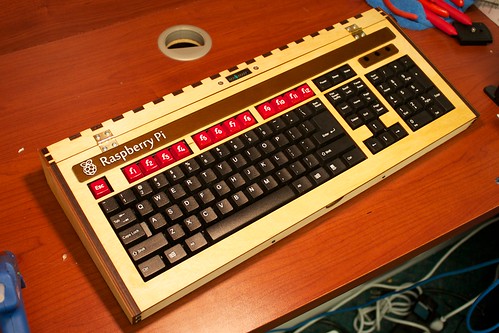
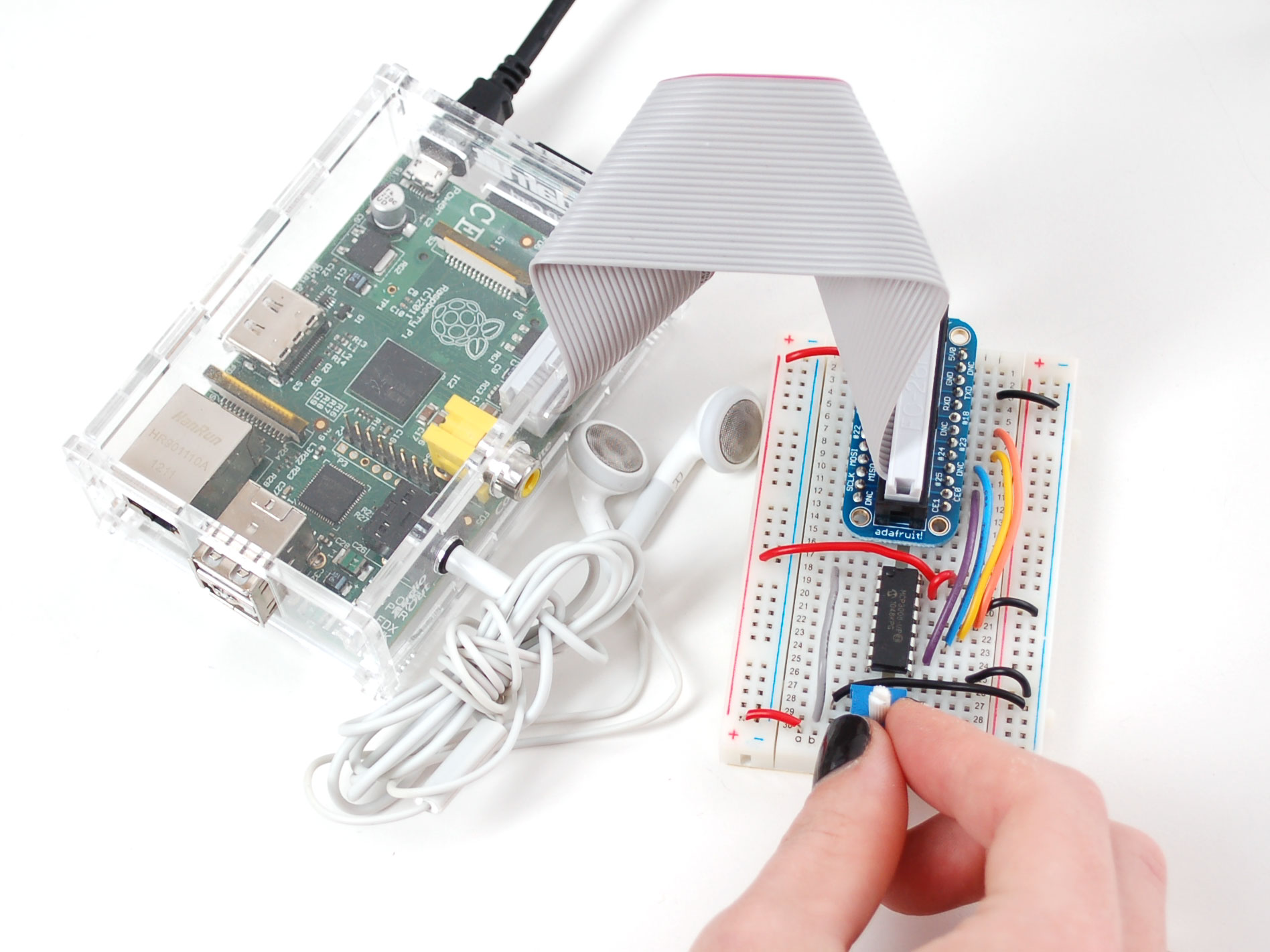
And now for your viewing pleasure, assorted Raspberry Pi pr0n:
 

Friday, May 06, 2011

Beagleboard, OMAP, and Angstrom

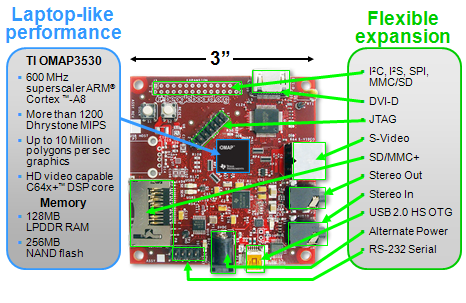
I've been doing a lot lately at work with the BeagleBoard, shown at right. It uses an OMAP processor from Texas Instruments. The OMAP family is ARM-based and includes a DSP core, along with an intimidatingly rich set of on-chip peripherals. The OMAP is built with a package-on-package arrangement so that the RAM die sits right on top of the processor die.

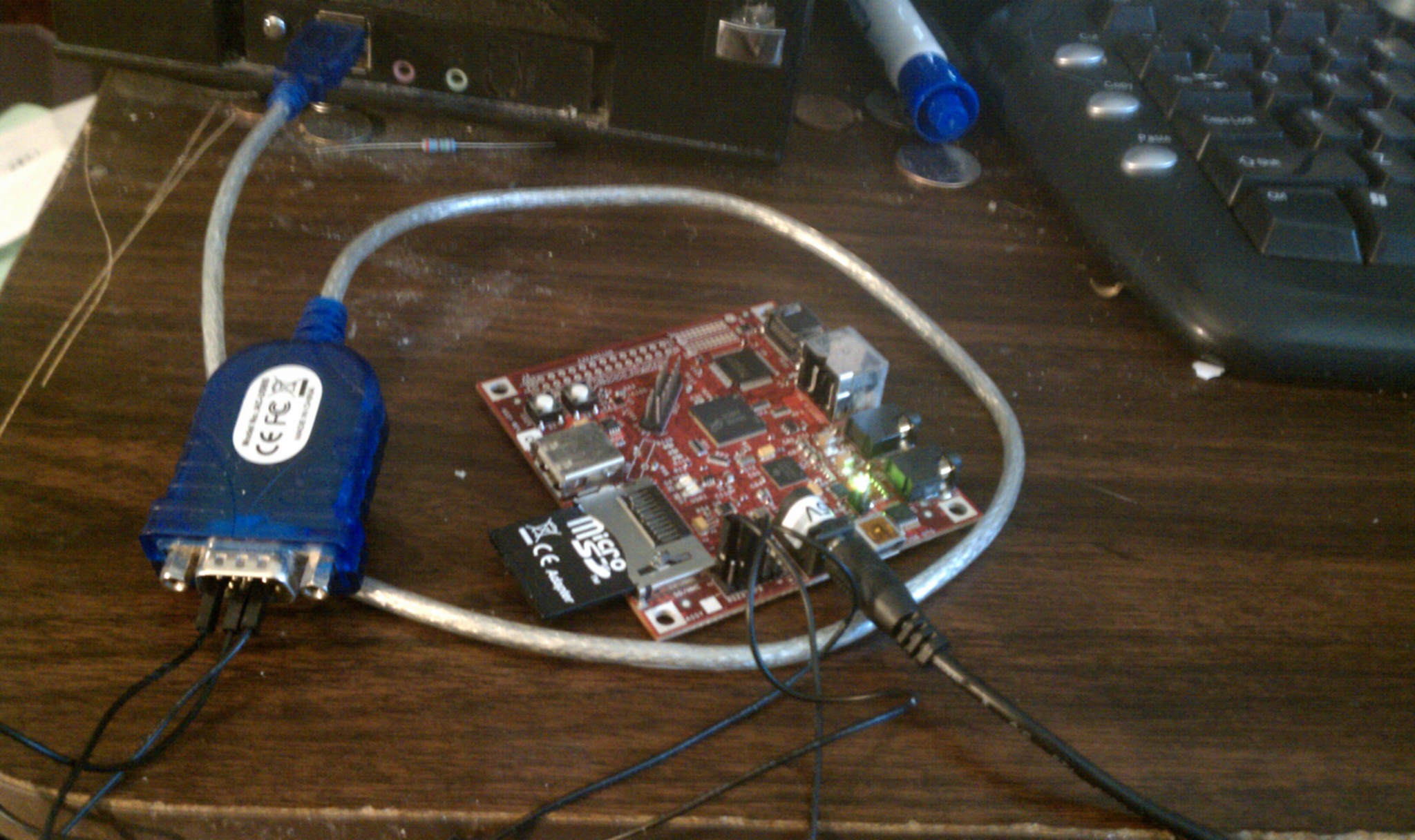
The board typically costs about $150 in the United States. You'll need a few things to work with it: an SD card, a USB adapter to write the SD card, a USB-to-serial adapter to communicate with the board, a 5-volt power supply, and later (maybe sooner) you'll want a USB hub with a RJ-45 ethernet jack.

A minimal setup is shown at right. This is just enough to connect to the board over a serial port (115.2 kbaud, 8N1, no flow control) and verify that you get a working Linux shell. The Angstrom Linux distribution has a bit of a learning curve but it seems well thought out.

I'm thinking of trying Angstrom on one of the AT91SAM7S boards from Sparkfun when I get a little spare time. I think that would work, and it would really rock to see full-blown Linux running on a $36 board. I don't know how I'd handle networking in that kind of situation, though.

Update: I am reminded that the SAM7S lacks an MMU so it can't run Angstrom. There is a different Linux distribution called uCLinux (see uclinux.org) that would work, maybe I'll try that some day.

Tuesday, December 21, 2010

Developing for the AT91SAM7 microcontroller

I once purchased a SAM7 P256 board from Sparkfun for $72. This post is a bunch of pointers to the resources I’ll need to develop for it. The same code will work on the H64 header board (only $35), which can be used in future USB projects. UPDATE: Sparkfun no longer sells the H64 header board, but they have a H256 board for $45.

This post assumes an Ubuntu Linux environment.
Set up the development environment.
Use Sam_I_Am to access the SAM-BA bootloader.
Some easily available demos and example programs
Other resources

Saturday, November 06, 2010

Remastering Ubuntu Mini Remix

Ubuntu Mini Remix is a very small, very efficient Ubuntu distribution created by Fabrizio Balliano. I discovered it when I needed to create a kiosk-like boot disk image that booted the user directly into a simple command-line application. I didn't need X Windows, OpenOffice, web access, or email, I just needed to run my application, and UMR was perfect for that. The baseline UMR image is about 165 MB, and is available for i386 and for amd64.

In my previous blog post, I explained how to create a debian package. Since then I've written a shell script that takes one or more debian packages and uses them to remaster UMR. If you wanted to use the debian package from the last blog post to update UMR, you could simply type:
(cd ../make-debian-pkg/; make)
./customize.sh \
    ../make-debian-pkg/foo-bar_1.0_i386.deb
If you have multiple debian packages to be included, simply add them as additional command line arguments. The result will be a file called "customized-umr-10.10-i386.iso", located in your home directory.

For very small additions, a package may be overkill. It might make better sense to edit the script to simply add the files you need, and in my situation at work, that was the approach I ultimately chose. But if your change is more substantial, and especially if you want to include other packages that you'll rely upon, you'll want to think about using package management.

If you want your boot image to take the user directly into your application as I did, you can go into the chroot jail and replace the file /etc/skel/.bashrc with a short script that calls your application. The command would look like this:
sudo cp my-bashrc ${CHROOT_JAIL}/etc/skel/.bashrc
and you'd want to put that with the lines where the comment says "Prepare to chroot", near line 63. (Take the line number with a grain of salt as I may end up editing it at some point.)

Tuesday, November 02, 2010

Making a debian release package

I've been doing a lot with Ubuntu Linux lately, and decided it was time to find out how to put together a debian package. Ubuntu shares Debian's package management system, having descended from Debian. I've banged my way through the code so you don't have to. Here I will just discuss a few highlights. There isn't that much to it. Since this is just an example, I didn't get very creative with the name or the contents. Running make will build foo-bar_1.0_i386.deb.

First a quick look at the files.
./Makefile
./control
./copyright
./postinst
./prerm
./usr/bin/say-hello
./usr/lib/python2.6/foobar.py
./usr/share/doc/foo-bar/foobar.txt
The three files in the "usr" directory tree will be copied into the target system when you say "dpkg -i foo-bar_1.0_i386.deb". If you then say "dpkg -r foo-bar", those three files will be removed. The postinst and prerm scripts can be used to perform actions after installation and before removal respectively, but here they just print messages to the console. The real meat is in the two files control and Makefile. control specifies the package name, version number, dependencies, and other information. Makefile takes pieces of that information to build makefile variables that will be used in creating the package. There isn't a heck of a lot to say about the process other than there is a special DEBIAN directory with meta-information about the package and how it should be installed and removed.

This is the minimal possible example. You can build a deb file this way and install it on an Ubuntu machine. But there are a lot of things that could be improved and cleaned up, and put in better compliance with common practices for making these packages more maintainable. The two big areas are (1) there are recommendations about additional fields to go into control, and (2) there is a tool called lintian, a sort of lint command for deb packages, whose advice should be applied. When I build this package, the advice I get is the following:
E: foo-bar: changelog-file-missing-in-native-package
W: foo-bar: third-party-package-in-python-dir usr/lib/python2.6/foobar.py
W: foo-bar: binary-without-manpage usr/bin/say-hello
W: foo-bar: maintainer-script-ignores-errors postinst
W: foo-bar: maintainer-script-ignores-errors prerm
where "E" and "W" are "Error" and "Warning". So that's not too bad.

Thursday, October 28, 2010

Customized Ubuntu distributions part three

Apparently most of the stuff in my previous posting was the wrong approach. I think I've finally got what I want. All this time, I've been trying to figure out how to do a live Linux CD that (a) includes some code we've been developing at work, and (b) boots very quickly and simply to where the user can use that code. The goal is to provide software tools to a partner company where everybody's laptop runs Windows, but all our stuff is written in Linux.

First I tried to build our code in Cygwin using the Windows version of libusb. I found that fraught with complexities of all sorts and eventually decided the Live CD approach sounded a lot easier. Besides, we wanted the Live CD/bootable USB stick anyway for some later plans.

Theoretically there are small Linux distributions (the most famous being Damn Small Linux) that can be used for this sort of thing. As soon as I started getting into that, I found that DSL is no longer maintained, the documentation for it is insufficient and the pieces that do exist contradict one another. I struggled to resolve dependency and version issues in porting our code to DSL and finally gave up. By that time, I had already discovered how to make an Ubuntu Live CD, and so I delivered one with the first piece of our code to our partner.

But I really wanted a much shorter boot time. I don't need X Windows or networking or OpenOffice or a web browser. I'd prefer to have a development environment on there in case the code required modification but even that is unnecessary.

In the past several days I've tinkered with about a dozen Linux distributions claiming to be "small" and found them all deficient in one way or another. I've tried dozens and dozens of permutations of dumb little tricks involving VirtualBox and QEMU and Ubuntu Customization Kit and burning CD-Rs and USB sticks. I've looked at what feels like hundreds of different web pages and blog postings, each claiming to have an authoritative and trustworthy solution to my problem. Each involves failures to account for discrepancies between versions, or the document I've found is old and inapplicable to what I'm doing, or the author made several minor assumptions that don't work in my environment.

Currently I'm looking at something called Ununtu Mini Remix which looks promising. It's looking very good so far, as I am remastering it with the information on the Ubuntu help website. Adding a shell script to /bin to make sure I can, and adding an "echo HELLO" to /etc/skel/.bashrc to make sure it appears when the disk boots into a bash session.

Everything was going great and then mksquashfs got hung up on the proc directory -- AH, this happened because when you finish a chroot session you must do three umounts (dev/pts, proc, sys) even if you weren't aware of having mounted them. Apparently chroot mounts them without telling you. Umount those in the chroot environment, exit, then umount edit/dev, and the mksquashfs goes just dandy.

So my two dumb tricks in /bin and /etc/skel/.bashrc worked like a champ in VirtualBox and now I'm going to try to make a bootable USB stick. Ubuntu's Startup Disk Creator likes the file (it's very picky about what ISO files are considered bootable) and the USB stick works great in my Windows laptop. Now we make the Angry Birds WHEEEE noise, however dumb some people might find the game. The next step is to make my tweaks into a Deb file using this HOWTO so they go in painlessly.

Grazie mille to Fabrizio Balliano for creating Ubuntu Mini Remix.


165MB Ubuntu livecd containing only the minimal Ubuntu package set. Wonderful as a rescue disk or as a base for Ubuntu derivative creation.

Saturday, October 23, 2010

Customized Ubuntu distributions part two

Turns out I was mostly still spinning my wheels here -- move on to part three of this tale for the solution to the problem.

After a brief visit to the world of Damn Small Linux and subsequent narrow escape from eternal damnation, I returned to Ubuntu with the idea of reducing the size (not as big a priority as I initially thought), speeding up the boot time, and running a program when the user logs into X.

First a quick note about the 9.10/10.04 UCK thing. What's working well for me is to run UCK on a box that has 10.04 installed, and apply it to a 9.10 ISO. Do not attempt to run UCK inside a VMware instance, it's just a lot of pain. You can run the resulting ISO in QEMU but don't forget the "-boot d" argument.

To shrink the distro, I removed OpenOffice, Ubuntu Docs, and Evolution. Things I added included autoconf, emacs, git, guile, and openssh-server.

The low-hanging fruit for speeding up boot time is to bring up networking as a background process, described here. Doing this in Ubuntu 9.10 means editing /etc/init.d/networking, adding "&" here:
case "$1" in
start)
        /lib/init/upstart-job networking start &
        ;;
People have given a lot of thought to other approaches to speed up Ubuntu's boot time, and maybe I'll blog more about that as I investigate it further. I really need to dig deeper into the boot time topic. It will likely warrant another blog post.

Having an app start immediately when the user logs in is somewhat interesting. The X session startup stuff is all in /etc/X11/Xsession.d/ and the main thing here is /etc/X11/Xsession.d/40x11-common_xsessionrc where we find a call to the user's ".xsessionrc" file. The user's directory is populated from /etc/skel, so the trick here is to create /etc/skel/.xsessionrc:
export LC_ALL=C
${HOME}/hello.sh &
where hello.sh is a sample shell script just to make sure I've got the principle down pat:
#!/bin/sh
sleep 2   # wait for other xinit stuff to finish
xterm -geometry 120x50+0+0 -e "echo HELLO WORLD; sleep 5"

Hmm... that worked for a bit, then stopped working. I've since discovered another file, /etc/gdm/PreSession/Default, which seems more relevant. But that starts the app just a little too early, before the user is actually logged into the X session, so maybe I should put a time delay in my app? Annoying.

Monday, October 18, 2010

Fun with customized Ubuntu distributions

At work we have an interesting problem. We are working with some companies in Taiwan. Obviously there's a language difference, but there is another difference as well. We are an Ubuntu Linux shop, and they all have Windows laptops. Periodically we have bits of test code that they need to use, and the OS gulf needs to be overcome.

My first whack at this issue was to try to use Cygwin to rebuild our tools from source on a Windows platform. But after I'd spent a few days dealing with libusb, and making not a whole lot of progress, a co-worker suggested a bootable USB stick. The Taiwanese folks get to keep their Windows laptops, but with a quick reboot they can temporarily use Linux machines just like ours. So I set about learning the art of bootable USB sticks, which in Ubuntu 9.10 is pretty painless. (This is not the case with Ubuntu 10.04. If you need to do this, stick with 9.10.)

Not to keep you in suspense, the two magical things are
  • Ubuntu Customization Kit, (sudo apt-get install uck) which produces an ISO file suitable for burning a CD or DVD which you can boot from, and
  • USB Startup Disk Creator (already present in your System>Administration menu) which puts that ISO file onto a USB stick and makes the stick bootable.
These are amazingly easy-to-use tools, given the complexity of what they're doing. In the bad old days, the Knoppix distribution existed solely for the purpose of rendering this feat possible for mortals. That said, I learned a few tricks about these things which I'll pass along here. Do NOT use Ubuntu 10.04, as there is a serious bug in that version of UCK plus a handful of annoying behavioral oddities. These are fixed in a future UCK release, but that's not available in the Ubuntu 10.04 repositories. In order to produce a USB stick which could be used with a Windows laptop to produce another bootable USB stick, I put a copy of the ISO file onto the USB stick. The instructions for copying the USB stick then go like this.
  • Boot into Windows and insert the first USB stick. Copy the ISO file somewhere memorable. Restart the laptop.
  • Boot into Ubuntu using the USB stick. Once you're booted, insert the second USB stick.
  • Bring up USB Startup Disk Creator. The original ISO file on the first USB stick (from which you are now running) will not be visible in the file system. But the Windows hard drive will be readable, so dig around in it to find the ISO file copy you just used. Use that as the source, and select the 2nd USB stick as the destination. Push the button.
  • Once that installation is complete, copy the ISO file from the Windows hard drive onto the second USB stick. Voila, a copy.
Using the first part (making an ISO image) I was able to produce a DVD with some of our tools for the Taiwanese folks to use. I set up Traditional Chinese and English as languages, with the default to boot into Traditional Chinese. But then because it had some of our source code, I encrypted this entire 725 MB file, which is ironic given that Ubuntu is open source. But there had to be a way to encrypt only the proprietary stuff.

On the next boot image I send them (which will be a USB stick, not a DVD, since USB sticks are oh so much sexier), the contents of the stick will be open source, and the proprietary stuff will be pulled down from a little tarball on some handy little server. The thing that pulls down the tarball and handles security is my little tarball runner script. The new ISO is at http://willware.net/tbr-disk.iso, and if you need to share some closed-source Linux code with people in China or Taiwan, feel free to use it.

To use this bit of cleverness, build some code on your Linux box, package it up as a tarball (including a run.sh shell script at the root level, in case you need to do installation stuff), and if necessary, encrypt it using (my tweaked version of) the Twofish algorithm found on Sourceforge. Then post it to the Internet and email the password only to your intended recipients.

If I find the time and energy, I'll package up the tarball runner and the Twofish module as a Deb package to make the installation painless.

Thursday, September 16, 2010

Tim BL's talk on Linked Data

I learned a lot from Tim Berners-Lee's TED talk from February 2009 about Linked Data. He talks a bit about his motivation for inventing the Web, which was that the data he encountered at CERN was in all different formats and on all different computer architectures and he spent a huge fraction of his time writing code to translate one format to another. He talks about how much of the world's data is still locked up in information silos -- a million disconnected little islands -- and how many of the world's most urgent problems require that data be made available across the boundaries between corporations, organizations, laboratories, universities, and nations. He has laid out two sets of guidelines for linked data. The first is for the technical crowd:

  1. Use URIs to identify things.
  2. Use HTTP URIs so that these things can be referred to and looked up ("dereferenced") by people and user agents.
  3. Provide useful information about the thing when its URI is dereferenced, using standard formats such as RDF/XML.
  4. Include links to other, related URIs in the exposed data to improve discovery of other related information on the Web.

The second set is for a less technical crowd:

  1. All kinds of conceptual things, they have names now that start with HTTP.
  2. I get important information back. I will get back some data in a standard format which is kind of useful data that somebody might like to know about that thing, about that event.
  3. I get back that information it's not just got somebody's height and weight and when they were born, it's got relationships. And when it has relationships, whenever it expresses a relationship then the other thing that it's related to is given one of those names that starts with HTTP.

It's a very eloquent talk, reminding me in places of David Gelernter's prophetic book Mirror Worlds.


What's remarkable about the Linked Data idea is that, as much as people tend to dismiss the whole semantic web vision, it really is making remarkable progress. The diagram above shows several interlinked websites with large and mutually compatible data sets.
  • DBPedia aims to extract linked data from Wikipedia and make it publicly available.
  • YAGO is a huge semantic knowledge base. Currently, YAGO knows more than 2 million entities (like persons, organizations, cities, etc.). It knows 20 million facts about these entities.
  • Lexvo.org brings information about languages, words, characters, and other human language-related entities to the Linked Data Web and Semantic Web.
  • The Calais web service is an API that accepts unstructured text (like news articles, blog postings, etc.), processes them using natural language processing and machine learning algorithms, and returns RDF-formatted entities, facts and events. It takes about 0.5 to 1.0 second depending on how big a document you send and the size of your pipe.
  • Freebase is an open repository of structured data of more than 12 million entities. An entity is a single person, place, or thing. Freebase connects entities together as a graph.
  • LinkedCT is a website full of linked data about past and present clinical trials.
Berners-Lee has recommended a very small set of Linked Data principles.
  • Use URIs as names for things.
  • Use HTTP URIs so that people can look up those names.
  • When someone looks up a URI, provide useful information, using the standards (RDF*, SPARQL)
  • Include links to other URIs so that they can discover more things.

Sunday, April 18, 2010

Autosci talk at Bar Camp Boston

Yesterday I had fun giving a talk on the automation of science at Bar Camp Boston. I was very fortunate to (A) have very little to say myself, so that I quickly got out of the way for others to discuss, and (B) have some very smart people in the room who got the idea immediately, some of them able to give the scientist's-eye view of this idea.

Discussion centered around a few topics. One was how comprehensive a role would computers play in the entire scientific process. There seemed to be consensus that computers could easily identify statistical patterns in data, could perform symbolic regression in cases of limited complexity and not too many variables, but that in the creation of scientific theories and hypotheses, there are necessary intuitive leaps that a machine can't make. Personally I believe that's true but I imagine that computers might demonstrate an ability to make leaps we can't make as humans, and I have no idea what those leaps would look like because they would be the product of an alien intelligence. If no such leaps occur, at least the collection of tools available to human scientists will hopefully have grown in a useful direction.

Another topic was the willingness of scientists to provide semantic markup for research literature. Only those expert in the field are qualified to provide such markup since it requires an in-depth understanding of the field as a whole, and the paper's reasoning process in particular. It's also likely to be a lot of work, at least initially, and there is as yet no incentive to offer scientists in exchange for such work. The notion of posting papers on some kind of wiki and hoping that semantic markup could be crowd-sourced was quickly dismissed. Crowd-sourcing doesn't work when there is a very precise correct answer and the number of people with that answer is very small.

There has been a lot of Twitter traffic around Bar Camp Boston, and I was able to find a few comments on my talk afterward. It looks like people enjoyed it and found it stimulating and engaging, so that's very cool. It turned out to be a good limbering-up for an immediately following talk on Wolfram Alpha. I found one particularly evocative tweet:
Has anyone approached a CS journal to have their content semantically marked up? #BCBos @BarCampBoston
Thinking about that question, I realized that computer science is the right branch of science to begin this stuff, and that the way to make it most palatable to scientists is to publish papers that demonstrate how to do semantic markup as easily as possible at time of publication (not as a later retrofit), how a scientist can benefit himself or herself by doing that work, and how to do interesting stuff with the markup of papers that have already been published. My quick guess is that some sort of literate programming approach (wiki) is appropriate. So lots to think about.

If you attended my talk, thanks very much for being there. I had a lot of fun, and hope you did too.

Saturday, April 10, 2010

Learning to live with software specifications

We software developers have a knee-jerk hatred of specifications. Rather than write a document describing work we plan to do, we would rather throw together a quick prototype and grow it into the final system. We sometimes feel like specs are for liberal-arts sissies and pointy-haired bosses. Our prehistoric brains want us to dismiss specifications as a waste of time or even an intentional misdirection of energy.

The truth of it is that specs build consensus between developers, testers, tech writers, managers, and customers. They make sure everybody agrees about what to build, how to test it, how to write a user manual for it, and what the priorities are.

The Agile guys talk about the exponentially increasing cost of fixing a bug. The later in the process you find that bug, the more troublesome and expensive it is to fix it. Fixing bugs in code is hard, even prototype code, and fixing text is easy.

Let's learn to trick our brains to work around our reluctance. The Head-First books always start with a great little explanation about how our prehistoric brain circuitry divvies up our attention, classifying things as interesting or boring, and determines what sticks in our memories. Sesame Street learned how to make stuff sticky by
  • repetition
  • lighting up more brain circuitry
  • infusing the topic with emotional content
  • relating it to things that were already sticky
One way to infuse your spec with emotional content would be to make it a turf war. That hooks into all our brain circuitry for tribes and feuds. But turf wars are traumatic and damaging to people and projects, so let's not do this.

To light up more brain circuitry, sketch out pieces of the spec on a big whiteboard. Draw a lot of pictures and diagrams. Use different colored markers. Get a few people together and generate consensus (not a turf war), and ask them to help identify issues that you forgot. That meeting is called a design review, like a code review for specs.

Who should write and own the spec?  Part three of Joel Spolsky's great four-part (1, 2, 3, 4) article answers this question, drawing on his experience at Microsoft. One person should write and own the spec, and the programmers should not report to that person. At Microsoft, that person is a program manager.

It's important to differentiate between
  • a functional spec (what the user sees and experiences, what the customer wants) dealing with features, screens, dialog boxes, UI and UX, work flow
  • and a technical spec (the stuff under the hood) dealing with system components, data structures and algorithms, communication protocols, database schemas, tools, languages, test methodologies, and external dependencies which may have hard-to-predict schedule impacts
Write the functional spec first, then the technical spec, then the code. If you love test-driven development then write the specs, then the tests, then the code.

Joel's article includes some great points on keeping the spec readable.
  • Use humor. It helps people stay awake.
  • Write simply, clearly, and briefly. Don't pontificate.
  • Re-read your own spec, many times. Eat your own literary dogfood. If you can't stay awake, nobody else will either.
  • Avoid working to a template unless politically necessary.
How do you know when the spec is done?
  • The functional spec is done when the system can be designed, built, tested, and deployed without asking more questions about the user interface or user experience.
  • The technical spec is done when each component of the system can be designed, built, tested, and deployed without asking more questions about the rest of the system.
This doesn't mean that these documents can never be updated or renegotiated. But the goal is to aim for as little subsequent change as possible.

I am still sorely tempted by the idea of a quick prototype, an "executable spec" that exposes bugs in design or logical consistency. Maybe it's OK to co-develop this with the spec, or tinker with it on one's own time, or consider it as a first phase of the coding. I'm still sorting this out. The basic rationale of a spec, that fixing bugs in text is easier and cheaper than fixing bugs in code, still needs to be observed.
Sunday, April 04, 2010

All web app frameworks lead to Rome

Earlier I blogged about how it seemed like web app development had just zoomed past me. Since then, I've buckled down and actually started to study this stuff. My earlier posting only talked about the presentation layer, HTML, Javascript, and CSS. I still have more to learn about those, but the really interesting stuff happens on the server.

In December I went to a two-day session on Hibernate and Spring, and it was full of mysterious jargon that made me sleepy: dependency injection, inversion of control, aspects, object-relational mapping, convention over configuration, blah blah blah. I kept at it, though, looking at Rails and later Django. I'm now waist-deep in building a MySQL-backed Django site. What I learned is that (A) all these web app frameworks are remarkably similar to one another, and (B) those jargon terms are a lot simpler than they seem.

Inversion of control means that the framework makes calls into your app code, rather than you calling the framework from a main() function. Dependency injection is a set of tricks to minimize dependencies between different Java source files. Aspects are Java tricks that you can do by wrapping your methods in other methods with the same signatures, a lot like decorators in Python. Object-relational mapping is creating classes to represent your DB tables: each instance represents a row, each column is represented by a setter and getter. The MVC pattern gives the lay of the land for all these frameworks, and all the presentation stuff I talked about before is limited to the "view" piece.

As I find my footing in the basics, I start to notice where the interesting bits of more advanced topics pop up. If I put a Django app and a Mediawiki on the same server, can I do a single sign-on for both of them? I think I can, by writing an AuthPlugin extension to make the Mediawiki accept Django's authentication cookie.

Don't ask Django to serve a PHP page because it doesn't include a PHP interpreter (what mod_php does for Apache). Your Apache config file must deal with PHP files before routing to Django.
    AliasMatch /([^/]*\.php) ..../phpdir/$1
    WSGIScriptAlias / ..../djangodir/django.wsgi

One thing I haven't quite understood is why the Django community seems to love Prototype and hate jQuery. Is that just because Prototype is included in the standard Django package? Is it purely historical, with jQuery the abandoned but superior Betamax to Prototype's VHS?