Friday, August 29, 2014

Of bicycle chain and sprockets

Here is the best video I've found for working on bicycle chain. I haven't looked extensively but this one gave me the information I needed, starting at the 34-second mark. I had to buy a length of chain and one of these tools shown in the video. I thought I might need a thing called a "master link" but that's really unnecessary. Bicycle chain is one example of roller chain, a mechanical engineering term for chains that follow the same principle.

The chain I'm using is 1/2"-1/8" single speed chain, also known as #410 chain. The first number (1/2") is the pitch, the distance between the centers of two consecutive rollers. The second number is the width, the distance between inner plates. These numbers, together with the roller diameter, determine the shape of the sprocket teeth. For #410 chain the maximum roller diameter is 5/16".

If you're going to build a gadget using bicycle chain as a drive chain, remember that you'll need a tensioner somewhere, something you can adjust to take up slack in the length of the chain. You'll need at least an inch of adjustment available (twice the pitch). In my design, I made the stepper motor moveable to take up chain slack.

On to the topic of sprocket design. The approach I used is basically guided by the red curves in the diagram to the left. Some sprocket designs truncate the teeth, which reduces friction but engages each roller for a little less time. I probably should have done that but it's not really necessary. The OpenSCAD code for my sprocket design appears at the top of the sprockets.scad source file in the Github repository for my printer. I tested the sprocket (Thingiverse, Shapeways) to make sure that in the absence of unreasonable friction, the chain could freely engage and disengage the teeth as it moved around at fairly high speed (much faster than it will move on the printer most of the time) and that worked fine.

There are a few different pieces, so let me step through it. The outer thing is a difference operation, which means that the first part (the union) establishes a block of stuff and the other parts are removed from it. So we begin with a rectangular solid stretching in the X direction from one roller to the next, with a Z height equal to the width of the chain. To that we add the "tooth" part, defined by the two upper red curves in the previous diagram. The first two pieces we remove are the cylindrical cutouts in which the rollers will sit when closest to the sprocket's center, defined by the two lower red curves. Finally, a couple of flat surfaces are cut out to taper the tooth in the Z direction, which allows the sprocket to still engage nicely when the chain isn't precisely coplanar.

module sprocket_tooth() {
    difference() {
        union() {
            translate([-1/4,0,-1/16])
                cube([1/2,3/8,1/8]);
            intersection() {
                translate([1/4, 0, -1/16])
                    cylinder(h=1/8, d=1-5/16, $fn=30);
                translate([-1/4, 0, -1/16])
                    cylinder(h=1/8, d=1-5/16, $fn=30);
            }
        }
        translate([1/4, 0, -1/8])
            cylinder(h=1/4, d=5/16, $fn=30);
        translate([-1/4, 0, -1/8])
            cylinder(h=1/4, d=5/16, $fn=30);
        multmatrix(m = [
            [1, 0, 0, -0.5],
            [0, 1, 4, -1.3],
            [0, 0, 1, 0],
            [0, 0, 0, 1]
        ])
            cube([1, 1, 1]);
        multmatrix(m = [
            [1, 0, 0, -0.5],
            [0, 1, -4, 2.7],
            [0, 0, 1, -1],
            [0, 0, 0, 1]
        ])
            cube([1, 1, 1]);
    }
}


POSTSCRIPT

I found with the design above that those teeth can easily get stuck if one of the links in the bike chain is stiff. I haven't done a lot of bike chain work, and I would imagine that people who do probably get better at avoiding or fixing stiff links, but I'm not there yet. So one thing I did was to make much less "aggressive" sprocket teeth. For my application, I get away with much shallower teeth, and have updated both the Thingiverse design and the Shapeways store accordingly.

I might have neglected to mention this elsewhere (though I think it's mentioned in both those places) that the sprocket for the stepper axle takes a 1/4-inch long 4-40 machine screw as a set screw.

Friday, August 22, 2014

Once more, with feeling

My too-clever-by-half use of laser-cut plywood gears ended badly. Small errors repeatedly accumulated to make the gears fit unreliably. It was a mess. I needed another idea.

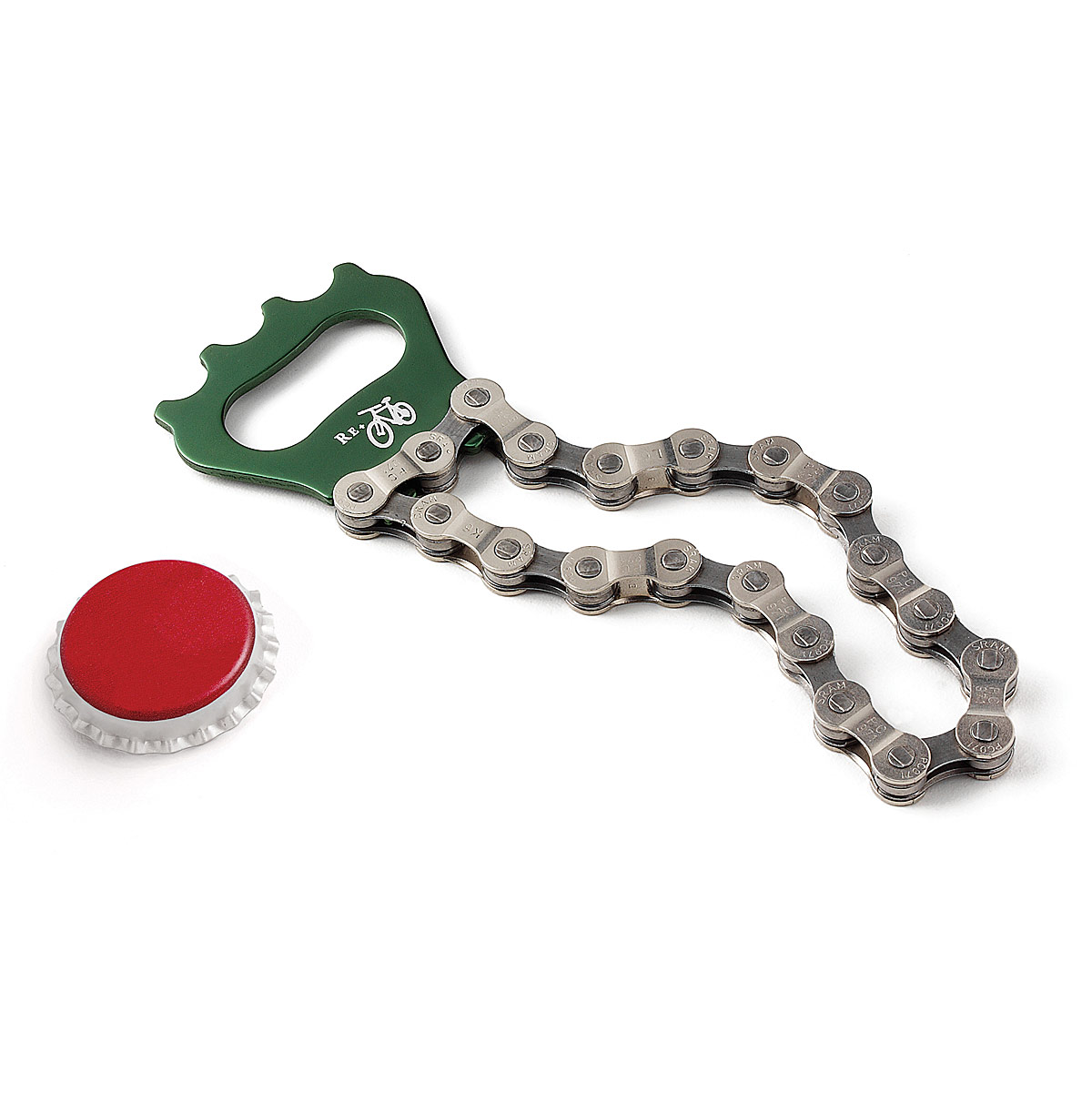
I started thinking about timing belts, especially something clever that Vik Olliver did on Rep Rap involving those ball chains used to switch ceiling lights on and off. I didn't really trust myself to be able to solder the ball chain together, and I continued scratching my head. Then I saw one of those bicycle chain bottle openers at a party, and realized that bicycle chain was the solution to my problem.

I started learning about roller chain and sprockets. It turns out sprocket tooth design is really pretty simple, much simpler than involute gear teeth, and I was able to design some sprockets with just a little study. It took a redesign because the first time, my stepper sprocket design assumed a friction fit would work, but when the part arrived, I discovered I'd need a set screw. In the picture to the left, I retrofitted a set screw on the initial sprocket design with sub-optimal results. This is probably adequate on a temporary basis, but an improved design is pending and should arrive by the end of August and should be in place for exhibition at Maker Faire.

 So this is the new design. I think it retains the Steampunk flavor of the original design, if perhaps not quite as pronounced. It's a bit simpler and all the plywood cutting can be done by hand with a compass and a jigsaw. So my design goal that it should be buildable by a person of minimal craftsmanship (like myself) is intact.

Barring some disaster, I expect to be exhibiting this printer (hopefully in operation) at Maker Faire NYC 2014, at the New York Hall of Science in Queens, on September 20th and 21st. If you're reading this, you're invited to come see it. If you can't make it, I'll try to post as much information here, on Github, and on Youtube as possible.

Wednesday, July 09, 2014

Cleaning up the SLA printer design

The stereolithographic printer described in my last post works, but it has a lot of room for improvement. Two obvious improvements are to use a stepper motor to raise and lower the build platform, allowing for automated operation, and to accept standard input files such as the STL file format.

In this post, I'd like to look at improvements in the overall mechanical design, specifically intended to make this printer easy for other people to build. I envision this as a printer that could be easily and affordably built by an after-school club, at a price of less than $600. The projector I used cost me $350 and I'll assume that's the same price for others. Likewise I expect others would pay about $75 for a couple of bottles of UV-cured resin. That leaves $75 for everything else. You have a stepper motor, a stepper control board, and a Raspberry Pi. I have a little wiggle room left for laser-cut plywood, and a 5-gallon bucket from Home Depot. I get my laser-cutting done at danger!awesome in Cambridge, MA. The bucket is bright orange, and that's the color I've used in this design, where the plywood is yellow and green (the green pieces having gear teeth that mesh). The pale blue stick-things are 1/4-20 threaded rods, cheaply available at Home Depot. The brighter blue thing is the stepper motor. The three green gears surrounding the threaded rods have captive nuts, allowing the stepper to raise and lower the threaded rods in lock-step. I'm kind of pleased with this design and I think this is what I'd like to show at Maker Faire NYC this year.
 

Looking down into the bucket, we can see one more circular piece of plywood which is the build platform. When we raise the three threaded rods high enough, the build platform comes up out of the bucket, which holds a layer of resin floating atop a salt water bath (a trick I borrowed from the Peachy Printer). And in fact, you could use this setup with a Peachy Printer rather than a projector, and you'd save money by doing so.

These gorgeous pictures are courtesy of Tinkercad.com. It's a pretty wonderful thing if you're doing 3D design. One last picture, showing the projector bouncing light off the mirror to illuminate the resin.


Sunday, July 06, 2014

Homebrew stereolithographic 3D printer

I've been interested in hobbyist 3D printers for quite a while. A friend of mine, Jeff Keegan has an exquisite blog about his several-year hobby of building RepRap-style printers. He has donated a printer to the Boston Museum of Science. I took a stab at starting a RepRap-style printer years ago, but my level of dedication was not equal to the task.

A RepRap-style printer (technically, a fused-deposition-modeling printer) works by squeezing molten plastic out of a hot nozzle onto the workpiece, where the plastic cools, forming the next vertical layer. One FDM printer can create some of the parts for another FDM printer, or to replace its own parts when they get worn. This was the idea behind the RepRap project, that partially self-reproducing printers could be very cheap.

Stereolithograhic 3D printers operate on a different principle, using ultraviolet light to cure resin. The video above illustrates this process.

The past few weeks I have been spending way too much time trying to figure out how to build a stereolithographic printer of my own. I looked at a lot of things other people have done and started doodling some ideas. A few times I made or purchased parts for a particular approach and later realized that it wouldn't work for some reason. But after a lot of tinkering, I finally produced the octahedron on the right.

My printer is pretty crude and is due for a lot of improvements in the days ahead. I had ordered a stepper motor controller board that didn't work, so I needed to manually rotate the threaded rod that lowers the workpiece into the resin bath.

Hopefully this picture isn't too confusing. A lot of this is stuff from the hardware store: a bucket, a lot of plywood, nuts and bolts, a piece of aluminum screen, a threaded rod, two straight rods. That black shape at the top held in place with a bungee cord is a pretty standard conference-room projector. When the thing is printing, the projector aims down into the bucket, which holds a quantity of resin floating on a much larger quantity of salt water. The ultraviolet light from the pattern projected onto the resin cures it in a particular shape, forming one layer of the product, and then the threaded rot rotates, moving the product down by one layer-height.

Currently I'm using a layer-height of 1/40th of an inch, which turns out to be quite visible to the naked eye, so I want to go down to something more like 1/100th of an inch.

I plan to post plans and software on Github and Instructables to enable anybody to build one of these printers for just a few hundred dollars. Most of the cost ($350) is the projector. I'd like to do the RepRap thing of using lots of pieces made by an identical printer, which would involve some redesign.

Tuesday, April 15, 2014

Espruino: JavaScript for embedded devices

My last post was really written primarily as background for this post. TL;DR: there is a lot we're doing right nowadays as software engineers, that we were screwing up badly 20 to 30 years ago.

I am moved to write this post because I've been playing with the Espruino board (having pre-ordered one during the Kickstarter campaign), which runs JavaScript close to the metal on an ARM processor.

JavaScript is a cool language because it draws upon a lot of the experience that engineers have gained over decades. Concurrent programming is hard, so JavaScript has a bullet-proof concurrency model. Every function runs undisturbed to completion, and communication is done by shared-nothing message passing. In the browser, JavaScript gracefully handles external events with unpredictable timing. That skill set is exactly what is required for embedded hardware control.

Crockford once referred to JavaScript as "Scheme with C syntax". JavaScript has many of the features that distinguish Lisp and its derivatives, and which set apart Lisp as probably the most forward-looking language ever designed.

This video is Gordon Williams, the creator of the Espruino board, speaking at a NodeJS conference in the UK. One of the great things he did was to write code that can run on several different boards. I'm particularly interested in installing it on the STM32F4 Discovery board because it costs very little and looks pretty powerful as ARM microcontrollers go. There is a Youtube playlist that includes these videos and others relating to the Espruino board.

A few decades' progress in computers and electronics

I got my bachelors degree in EE in 1981 and went to work doing board-level design. Most circuit assembly was wire-wrap back then, and we had TTL and CMOS and 8-bit microcontrollers. Most of the part numbers I remember from my early career are still available at places like Digikey. The job of programming the microcontroller or microprocessor on a board frequently fell to the hardware designer. In some ways it was a wonderful time to be an engineer. Systems were trivially simple by modern standards, but they were mysterious to most people so you felt like a genius to be involved with them at all.

After about 15 years of hardware engineering with bits of software development on an as-needed basis, I moved into software engineering. The change was challenging but I intuited that the years to come would see huge innovation in software engineering, and I wanted to be there to see it.

Around that time, the web was a pretty recent phenomenon. People were learning to write static HTML pages and CGI scripts in Perl. One of my big hobby projects around that time was a Java applet. Some people talked about CGI scripts that talked to databases. When you wanted to search the web, you used Alta Vista. At one point I purchased a thick book of the websites known to exist at the time, I kid you not. Since many websites were run by individuals as hobbies, the typical lifespan of any given website was short.

Software development in the 80s and 90s was pretty hit-or-miss. Development schedules were almost completely unpredictable. Bugs were hard to diagnose. The worst bugs were the intermittent ones, things that usually worked but still failed often enough to be unacceptable. Reproducing bugs was tedious, and more than once I remember setting up logging systems to collect data about a failure that occurred during an overnight run. Some of the most annoying bugs involved race conditions and other concurrency issues.

Things are very different now. I've been fortunate to see an insane amount of improvement. These improvements are not accidents or mysteries. They are the results of hard work by thousands of engineers over many years. With several years of hindsight, I can detail with some confidence what we're doing right today that we did wrong in the past.

One simple thing is that we have an enormous body of open source code to draw upon, kernels and web servers and compilers and languages and applications for all kinds of tasks. These can be studied by students everywhere, and anybody can review and improve the code, and with rare exceptions they can be freely used by businesses. Vast new areas of territory open up every few years and are turned to profitable development.

In terms of concurrent programming, we've accumulated a huge amount of wisdom and experience. We know now what patterns work and what patterns fail, and when I forget, I can do a search on Stackoverflow or Google to remind myself. And we now embed that experience into the design of our languages, for instance, message queues as inter-thread communication in JavaScript.

Testing and QA is an area of huge progress over the last 20 years. Ad hoc random manual tests, usually written as an afterthought by the developer, were the norm when I began my career, and many managers frowned upon "excessive" testing that we would now consider barely adequate. Now we have solid widespread expertise about how to write and manage bug reports and organize workflows to resolve them. We have test-driven development and test automation and unit testing and continuous integration. If I check in bad code today, I break the build, suffer a bit of public humiliation, and fix it quickly so my co-workers can get on with their work.

I miss the simplicity of the past, and the feeling of membership in a priesthood, but it's still better to work in a field that can have a real positive impact on human life. In today's work environment that impact is enormously more feasible.

Sunday, April 13, 2014

The whole Heartbleed thing

Lots of times, these reports are much more about theoretical possibilities than real events. The nature of this vulnerability is that attackers can get peeks at blocks of memory in servers. That memory is changing all the time as the server is doing stuff. It's a possibility that the block of memory happens to have a copy of your password or other information when the attacker grabs it.

Criminals who do these kinds of attacks will act on anything they find very quickly, because they know that victims will respond quickly by changing passwords, shutting off credit cards, etc. They would leave evidence if it had happened in any significant numbers, and there are places you could reliably find that evidence discussed (Bruce Schneier's blog, the EFF website) and the only mention is that certain big government agencies probably exploited the vulnerability, but it appears criminals probably haven't done so. The vulnerability existed for two years before it was publicly announced.

So the NSA has your passwords, but they probably had them anyway. The big question is, what information do you feel you MUST protect? Financials: online banking stuff, or credit card stuff, or your Paypal account, or the online access to your IRA or H&R Block. Medical: your doctor's patient portal website, any logins you have with hospitals or medical centers. Dating websites? Sexual fetish websites? I think I've exhausted the limits of my paltry imagination.

Those would be good passwords to change. You probably don't need to change your Facebook password, unless you're worried that NSA employees will get drunk and trash your Farmville farm.

More information at http://heartbleed.com/ but it tends to run to the rather technical. You can test any website's vulnerability using the tool at http://filippo.io/Heartbleed/.

Heartbleed is a buffer exploit, illustrated at http://xkcd.com/1354/. You tell the server you want some information which should be X letters long, but you ask for a much larger X, so that you get extra information from the server memory following what you asked for. The extra information might contain passwords and other profitable secrets.

Buffer exploits have been understood for years. What is supposed to happen is that the server's software should reject the too-large X value, but this stuff is programmed by fallible humans. Here is a very good (but pretty technical) explanation of the programming mistake.

Wednesday, December 11, 2013

ZeroMQ solves important problems

ZeroMQ solves big problems in concurrent programming. It does this by ensuring that state is never shared between threads/processes, and the way it ensures that is by passing messages through queues dressed up as POSIX sockets. You can download ZeroMQ here.

The trouble with concurrency arises when state or resources are shared between multiple execution threads. Even if the shared state is only a single bit, you immediately run into the test-and-set problem. As more state is shared, a profusion of locks grows exponentially. This business of using locks to identify critical sections of code and protect resources has a vast computer science literature, which tells you that it's a hard problem.

Attempted solutions to this problem have included locks, monitors, semaphores, and mutexes. Languages (like Python or Java) have assumed the responsibility of packaging these constructs. But if you've actually attempted to write multithreaded programs, you've seen the nightmare it can be. These things don't scale to more than a few threads, and the human mind is unable to consider all the possible failure modes that can arise.

Perhaps the sanest way to handle concurrency is via shared-nothing message passing. The fact that no state is shared means that we can forget about locks. Threads communicate via queues, and it's not so difficult to build a system of queues that hide their mechanics from the threads that use them. This is exactly what ZeroMQ does, providing bindings for C, Java, Python, and dozens of other languages.

For decades now, programming languages have attempted to provide concurrency libraries with various strengths and weaknesses. Perhaps concurrency should have been identified as a language-neutral concern long ago. If that's the case, then the mere existence of ZeroMQ is progress.

Here are some ZeroMQ working examples. There's also a nice guide online, also available in book form from Amazon and O'Reilly.

Saturday, November 23, 2013

What's up with Docker?

I've been hearing about Docker lately. Fair disclosure: I am no Docker expert. I've just tinkered with it a little bit so far and this post is part of my process of getting acquainted with it, and I'll probably update this post if I learn anything noteworthy.

It seems to be an interesting and useful wrapper for Linux Containers, a relatively new feature of the Linux kernel. Docker tries to solve the problem of providing a uniform execution environment across development and production.

In the Python world, virtualenv and pip create a sandbox with specific version numbers for various Python packages, regardless of what may be installed globally on the machine. Docker creates a sandbox of an entire Linux environment, much like a virtual machine, but much lighter-weight than a virtual machine.

Docker instances start in fractions of a second and occupy vastly smaller resources on your laptop or server than a virtual machine would. These days I work on a Macbook and run Linux in a virtual machine, and I'm told it will be practical to simultaneously run multiple Docker instances in the VM. So if you're somebody who's thought it would be fun to write software to run on multiple computers on a network but you haven't had the actual computers available, Docker is for you. I'm interested in Redis as a distributed task queue.

Thursday, October 31, 2013

Some favorite crowd-funded projects

There is a lot going on with crowd-funding these days. Over the past year or so, it has become huge. One might venture to say that it is a significant source of innovation in science, technology and art. Obviously there will be projects that cannot be crowd-funded; it is difficult to imagine a successfully crowd-funded Mars mission or cancer cure. But the space of feasible new projects is vast, and what follow are a few of my favorite crowd-funded projects.

But first, there is a recent noteworthy development from the SEC: previously allowed only to hand out rewards, crowd-funding campaigns will soon be able to award equity too. Equity had thus far been only for accredited investors, people with buckets of spare money in their garages and garden sheds. The possibility of investing in a successful venture rather than simply receiving a toy and a good feeling might make the already-fascinating crowd-funding scene a much more interesting place. It could play an important role in economic recovery.

OCULUS RIFT

The Oculus Rift is a virtual-reality headset representing an enormous improvement in performance-to-price ratio. The head tracking is smooth and the graphics are good. This is one of the first crowd-funded projects I heard about, and the first one I contributed to. For $300, I got a headset with a very entertaining demo, and if I get up the energy I will do something myself with science education.

By getting in early and having a huge success, the Oculus Rift set a precedent for big splashy projects, and probably helped Kickstarter as much as Kickstarter helped Oculus.

CastAR from TECHNICAL ILLUSIONS

CastAR is another virtual reality gadget, this time a pair of glasses that project an image onto a retroreflective surface in front of the user. One big innovation here is that the virtual reality can be mixed with actual reality, for instance using game pieces or other objects. Also, because the user is looking at things some distance away, eye strain is reduced. The head-tracking on CastAR follows both rotation and translation where the Oculus Rift only follows rotation.

BLEDUINO

This is a Bluetooth-enabled Arduino board. Arduino is a cheap easy-to-use controller board for hobbyist projects and art installations. With Bluetooth, whatever you're building can connect to a phone or tablet.

ESPRUINO

The Espruino is another Arduino-based controller board. What's unique is that it is designed to operate with a language called JavaScript, which has been used in web browsers for a long time but has slowly been gaining momentum as a hardware control language.

CHINEASY

This is an instructional program to teach yourself Mandarin. There are flashcards and animations to learn the written characters, and audio materials to learn the spoken language.

STAR TREK: RENEGADES

If you miss the pre-J-J-Abrams Star Trek franchise, this is for you. This movie brings back Walter Koenig (Chekhov from the original series) with several actors from Star Trek: Voyager. It is set ten years after Voyager's return to human space, and politics and hilarity ensue.

PEBBLE SMARTWATCH

Another big success story, the Pebble can now be purchased for $150 at Best Buy. It connects to your phone and can run Android apps on a very small screen. It has a magnetometer (compass), a three-axixs accelerometer, Bluetooth, ambient light sensors, a 144x168-pixel screen, and a week of battery life between charges. It connects via Bluetooth to your phone so the phone can stay in your pocket most of the time.


My long list below includes some projects that were already funded and have gained significant fame, like the Oculus Rift virtual reality headset, or the Pebble smartwatch now available at Best Buy.

Random projects

Phone and tablet

Electronics and computers

Robots and Flying Things

Gaming

Maker stuff

Here's an interesting list of crowd-funding resources: http://crowdfundingforum.com/showthread.php/6748-List-of-All-Crowdfunding-Sites-and-Platforms-Ever-Expanding

The shortened URL for this post is http://goo.gl/ehfBQb.

Friday, October 25, 2013

Bar Camp Boston 2013 talk on automation of science

This is an outline for a talk I gave at Bar Camp Boston 8 on the automation of science. It's a topic I've blogged and spoken about before. The shortened URL for this post is http://goo.gl/rv3Xik.

In 2004, a robot named Adam became the first machine in history to discover new scientific knowledge independently of its human creators. Without human guidance, Adam can create hypotheses to explain observations, design experiments to test those hypotheses, run the experiments using laboratory robotics, interpret the experimental results, and repeat the cycle to generate new knowledge. The principal investigator on the Adam project was Ross King, now at Manchester University, who published a paper on the automation of science (PDF) in 2009. Some of his other publications: 1, 2, 3.

Adam works in a very limited domain, in nearly complete isolation. There is plenty of laboratory automation but (apart from Adam) we don't yet have meaningful computer participation in the theoretical aspect of scientific work. A worldwide scientific collaboration of human and computer theoreticians working with human and computer experimentalists could advance science and medicine and solve human problems faster.

The first step is to formulate a linked language of science that machines can understand. Publish papers in formats like RDF/Turtle or JSON or JSON-LD or YAML. Link scientific literature to existing semantic networks (DBpedia, Freebase, Google Knowledge Graph, LinkedData.org, Schema.org etc). Create schemas for scientific domains and for the scientific method (hypotheses, predictions, experiments, data). Provide tutorials, tools and incentives to encourage researchers to publish machine-tractable papers. Create a distributed graph or database of these papers, in the role of scientific journals, accessible to people and machines everywhere. Maybe use Stackoverflow as a model for peer review.

Begin with very limited scientific domains (high school physics, high school chemistry) to avoid the full complexity and political wrangling of the professional scientific community in the initial stages. As this stuff approaches readiness for professional work, deploy it first in the domain of computer science and other scientific domains where it can hope to avoid overwhelming resistance.

Machine learning algorithms (clustering, classification, regression) can find patterns in data and help to identify useful abstractions. Supervised learning algorithms can provide tools of collaboration between people and computers.

The computational chemistry folks have a cool little program called Babel which translates between a large number of different file formats for representing molecular structures. It does this with a rich internal representation of structures, and pluggable read and write modules for each file format. At some point, something like this for different file formats of scientific literature might become useful, and might help to build consensus among different approaches.


A treasure trove would be available in linked patient data. In the United States this is problematic because of the privacy restrictions associated with HIPAA regulation. In countries like Iceland and Norway which have universal health care, there would be no equivalent of HIPAA, and those would be good places to initiate a Linked Patient Data project.

Thursday, October 17, 2013

The first neon sign I've ever wanted to own

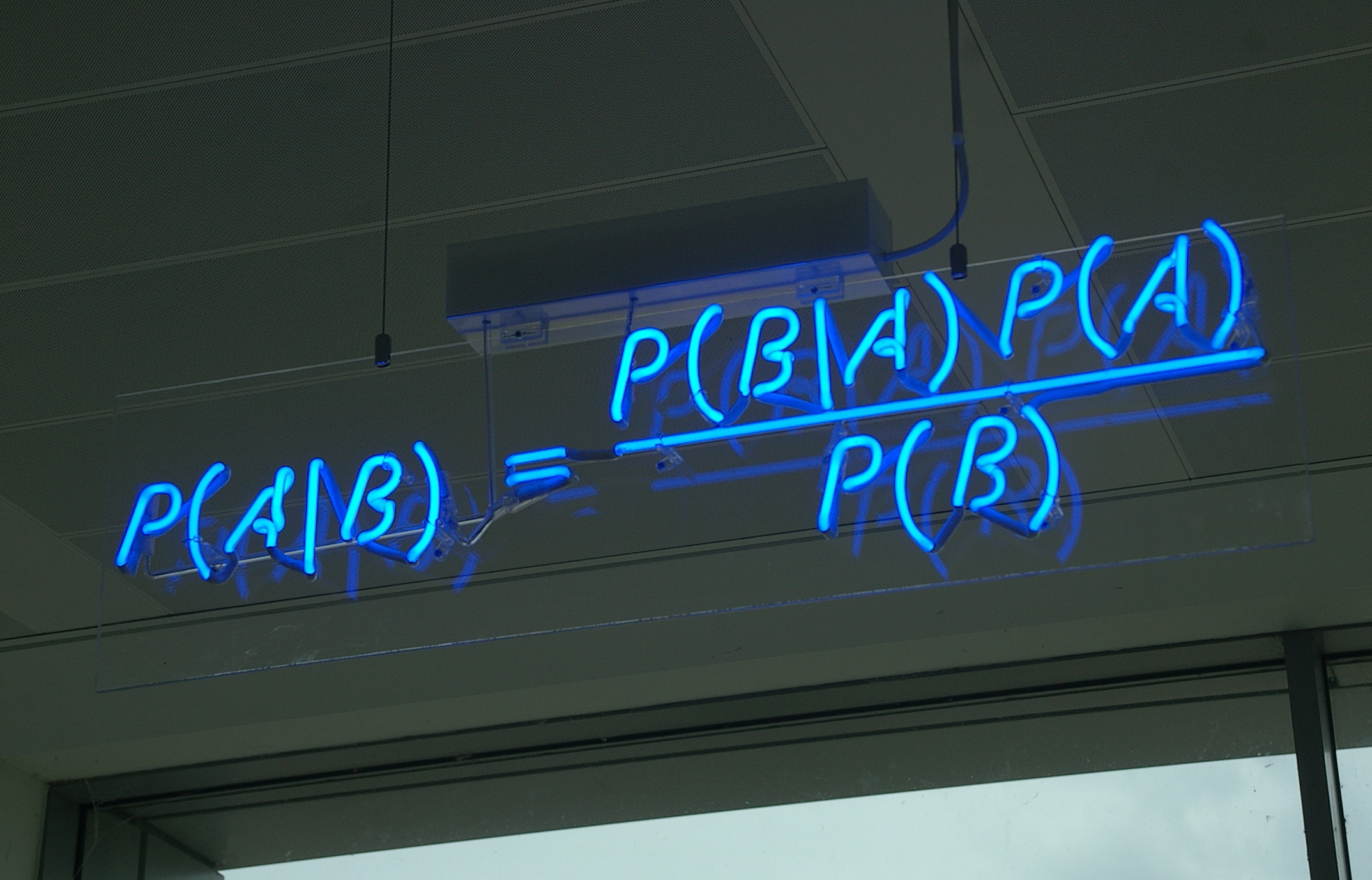
This sign appears in the Cambridge UK office of Autonomy Corporation. I want one. I need to talk to the people who make neon signs. There are a few online threads (1, 2) where people express curiosity about this sign.

This equation is Bayes' Law. Thomas Bayes (1701-1761) proposed it as a way to update one's beliefs based on new information. I saw this picture on a blog post by Allen Downey, author of Think Bayes, and whom I recently had the pleasure of meeting briefly at a Boston Python meetup. Very interesting guy, also well versed in digital signal processing, another interest shared with myself. Before the other night, I probably hadn't heard the word "cepstrum" in almost twenty years.

Allen's blog is a cornucopia of delicious problems involving Bayes' Law and other statistical delights that I learned to appreciate while taking 6.432, an MIT course on detection and estimation that I'm afraid may have been retired. The online course materials they once posted for it have been taken down.

But imagine my satisfaction upon looking over Think Bayes and realizing that it is the missing textbook for that course! I haven't checked to see that it covers every little thing that was in 6.432, but it definitely covers the most important ideas. At a quick glance, I don't see much about vectors as random variables, but I think he's rightly more concerned with getting the ideas out there without the intimidation of extra mathematical complexity.

Thursday, May 30, 2013

Still plugging away on the FPGA synthesizer

I really bit off a good deal more than I could chew by trying to get that thing running as quickly as I did. A lot of what I'm doing now is going back over minute assumptions about what should work in real hardware, trying to get MyHDL's simulator to agree with Xilinx's ISE simulator (ISE Sim doesn't like datapaths wider than 32 bits) and trying to get the chip to agree with either of them. The chip seems to have a mind of its own. Very annoying.

Anyway I've moved this stuff into its own Github repository so you can show it to your friends and all stand around mocking it without the distraction of other software I've written over the years. So, for as long as it still doesn't work (and with, I hope, the good grace to do it behind my back), y'all can continue with that mocking. Once it actually does what it's supposed to do, all mocking must of course cease.

Saturday, May 18, 2013

My FPGA design skills are a little rustier than I thought

Today I'm going to Makerfaire in the Bay Area. I'd had an idea percolating in my head to use an FPGA to implement fixed-point equivalents of the analog music synthesizer modules of the 1970s, and gave myself a couple of weeks to design and build a simple synthesizer. I'd been a synthesizer enthusiast in high school and college, having attended high school with the late David Hillel Wilson and had many interesting discussions with him about circuit design for synthesizers, a passion he shared with his father. While he taught me what he knew about synthesizers, I taught him what I knew about electronics, and we both benefitted.

Now I have to confess that since my switch to software engineering in the mid-90s, I haven't really done that much with FPGAs, but I've fooled around a couple of times with Xilinx's ISE WebPack software and stumbled across MyHDL, which dovetailed nicely with my long-standing interest in Python. So I ordered a Papilio board and started coding up Python which would be translated into Verilog. My humble efforts appear on Github.
There was a lot of furious activity over the two weeks before Makerfaire, which I hoped would produce something of interest, and I learned some new things, like about delta-sigma DACs. Being an impatient reader, I designed the delta-sigma DAC myself from scratch, and ended up diverging from how it's usually done. My design maintains a register with an estimate of the capacitor voltage on the RC lowpass driven by the output bit, and updates that register (requiring a multiplier because of the exp(-dt/RC) term) as it supplies bits. It works, but has a failure mode of generating small audible high frequency artifacts particularly when the output voltage is close to minimum or maximum. On the long boring flight out, I had plenty of time to think about that failure mode, and it seems to me the classic delta-sigma design would almost certainly suffer from it too. I think it could be reduced by injecting noise, breaking up the repetitive patterns that appear in the bitstream.

I like Python a lot but I'm not sure I'm going to stay with the MyHDL approach. As I learn a little more about Verilog, it seems like a probably better idea to design directly in Verilog. The language doesn't look that difficult, as I study MyHDL's output, and while books on Verilog tend toward expensive, some of them are more affordable. Those books are on the Kindle, and a couple others are affordable in paper form.

MyHDL-translated designs do not implement Verilog modularity well, and I think it would be good to build up a library of Verilog modules in which I have high confidence. MyHDL's simulation doesn't always completely agree with what the Xilinx chip will do. And while MyHDL.org talks a lot about how great it is to write tests in Python, the Verilog language also provides substantial support for testing. Verilog supports signed integers, but as far I've seen, MyHDL doesn't (this is INCORRECT, please see addendum below), and for the fixed-point math in the synth modules, that alone would have steered me toward straight Verilog a lot sooner had I been aware of it.

It appears the world of Verilog is much bigger and much more interesting than I'd originally thought. I've started to take a look at GPL Cver, a Verilog interpreter that (I think) has debugger-like functions of setting breakpoints and single-stepping your design. I had been thinking about what features I'd put into a Verilog interpreter if I were writing one, and a little googling showed me that such a thing already existed. So I look forward to tinkering with CVer when I get home from Makerfaire.

EDIT: Many thanks to Jan Decaluwe, the developer of MyHDL, for taking the time to personally respond to the challenges I encountered with it. Having had a couple of days to relax after the hustle and bustle of Makerfaire, and get over the disappointment of not getting my little gadget working in time, I can see that I was working in haste and neglected to give MyHDL the full credit it deserves. At the very least it explores territory that is largely uncharted, bringing modern software engineering to the HDL world where (like all those computational chemists still running Fortran code) things have tended to lag behind the times a bit.

In my haste, I neglected the documentation specifically addressing signed arithmetic in MyHDL. I didn't take the time to read the docs carefully. As Jan points out in his writings and in the comment to this blog, MyHDL's approach to signed arithmetic is in fact simpler and more consistent than that of Verilog. What does signed arithmetic look like in MyHDL? It looks like this.

    # INCORRECT
    >>> x = Signal(intbv(0)[8:])
    >>> x.next = -1
    Traceback (most recent call last):
        ...blah blah blah...
    ValueError: intbv value -1 < minimum 0

    # CORRECT, range is from min to max-1 inclusive
    >>> x = Signal(intbv(0, min=-128, max=128))
    >>> x.next = -1      # happy as a clam

In the case where MyHDL's behavior appeared to diverge from that of the physical FPGA, my numerically-controlled amplifier circuit above uses one of the hardware multipliers in the XC3S500E, which multiplies two 18-bit unsigned numbers to produce a 36-bit unsigned product. When my music synthesizer was at one point unable to make any sound, I tracked it down to the amplifier circuit, which was working fine in simulation. There was already a hardware multiplier working in the delta-sigma DAC. I poked at things with a scope probe, and scratched my head and studied my code and studied other peoples' code and ultimately determined that I needed to latch the factors in registers just prior to the multiplier. Whether it's exactly that, I still can't say, but finally the amp circuit worked correctly.

I wrongly concluded that it indicated some fault in MyHDL's veracity as a simulator. If it didn't work in the chip, it shouldn't have worked in simulation. But with more careful thought I can see that it's really an idiosyncrasy of the FPGA itself, or perhaps the ISE Webpack software. I would expect to run into the same issue if I'd been writing in Verilog. I might have seen it coming if I'd done post-layout simulation in Webpack, and I should probably look at doing that. Once the bits are actually inside the chip, you can only see the ones that appear on I/O pins.

Monday, March 04, 2013

The Digi-Comp 1 rides again?

As computer people go, I'm rather an old fart, and my favorite childhood toy was this plastic computer, the Digi-Comp 1. See the three horizontal red things that run almost the full width? Those are flipflops, and the window on the left shows whether they are in the zero or one position. The six vertical metal bars in front are AND gates, and the little white tubes stuck onto the pegs on the fronts of the flipflops tell whether that bit is factored into the AND term. The six red plastic things on the top, together with similar stuff on the back, form three OR gates, which drive the values of the flipflops on the next clock edge. The two white sliders on the bottom worked in opposition, providing a hand-powered two-phase clock to drive all this stuff.

Over the past couple of days I placed an order with danger!awesome, a laser cutter shop in Cambridge MA. They have a nifty collection of laser cutters and were happy to hear that design files are available on the Thingiverse website. So I ordered some stuff and picked it up this evening, and that was fun. I had hoped they could make me this marble binary adder, but the designer didn't supply design files they could use. So no marble adding machine for me. Darn.
Thinking about that, my mind inevitably went back to the Digi-Comp 1. I started wondering whether I could build a Digi-Comp 1 using laser cut plywood, like the other trinkets I picked up this evening (a Companion Cube, a desktop trebuchet, a Shrimpbot, and a few little animals). Could that be feasible? The Digi-Comp 1 was basically a programmable logic array, which consists of two rectangular regions, one for AND gates and one for OR gates. On the Digi-Comp 1 these are respectively the front surface and the back surface of the device.

I thought about this for a while and came up with some very incomplete rough sketches to solve the problems of how the gates would work and how the binary values should be latched for one clock cycle. As with the Digi-Comp 1, this would be a rectangular thing with the AND plane on the front and the OR plane on the back. The flipflops would be horizontal bars along the front with two positions (left=0, right=1) and possibly the same window display that appears on the original Digi-Comp 1. The AND gates are vertical bars also on the front, connecting to vertical bars on the back. The OR bars on the back can move left and right if permitted. At a certain point in the clock cycle, the horizontal position of each OR bar is inverted with a little lever and latched as the new position for the corresponding flipflop. There is still a lot of mechanical engineering to think about. Should the bars be retracted with springs or rubber bands? There needs to be a lot of machinery to get everything to move when and where it's supposed to, and there needs to be a crank on the side to drive it. So there will be cams and gears and all sorts of fun stuff.

UPDATE: I found a place called Minds-On Toys that is selling a Digi-Comp kit which reproduces the exact mechanical design of the original. Looks very nice, except for the labor-intensive-looking bit at the bottom about fabricating your own plastic tubes.

Saturday, February 02, 2013

Ruby and Rails and all that stuff

At the suggestion of a recruiter, I'm learning Ruby on Rails this weekend. I was active on the comp.lang.python mailing list when Matz came around talking about Ruby. It seemed like a good thing, but I mostly ignored Ruby for years because it seemed to be solving problems that I already had solutions for with Python. Likewise, Rails seemed to retread the same ground already covered by Django.

Motivated to take another look because of the wild popularity of Rails, I see there's something in Ruby that deserves attention, which is blocks (anonymous closures, or what Lispers would call lambda expressions). They function as closures, and any language that makes a closure a first-class object is a good language. There are a ton of good Ruby tutorials. I myself am partial to Ruby in Twenty Minutes. There are also a good Rails tutorial (and I'm sure there are several others). Another notable thing in the Ruby community is RDoc, an unusually good documentation tool.

I'll be installing Ruby and Rails on an Ubuntu 12.04 machine. I don't like how old the packages are in the official Ubuntu repository, so I'll install from Ruby websites instead. The first thing to do is install RVM with these two commands:
$ curl -L https://get.rvm.io | bash -s stable --ruby
$ source /home/wware/.rvm/scripts/rvm
Later I reversed my decision about the official repositories, when I discovered I could install "ruby1.9.3". What RVM offers is an ability to run multiple Ruby environments on the same machine, like Python's virtualenv.

So now Ruby is installed and you can type "irb" to begin an interactive Ruby session. Next install Rails, and some additional things you'll need soon:
$ gem install -V rails
$ sudo apt-get install libsqlite3-dev nodejs nodejs-dev
Now you can jump to step 3.2 of the Rails tutorial and you should be good to go. Or you can go to the Github repository (README) which I cloned from the railsforzombies.org folks, and that's where I'm going to be tinkering for a while.

When debugging Rails controller code, you'll want to uncomment "gem debugger" in Gemfile, insert "debugger" into your code, and then reload the page in your browser, and it will stop the development server and put you into an interactive shell with all the variables available in mid-process. You'll also have GDB commands like "step", "next", "continue", and breakpoints.

When you're ready to deploy, consider Heroku, a Rails hosting service that lets you use one virtual machine for free. I've deployed my Zombie Twitter app there, and after a few initial bumps, things have gone pretty smoothly.

Here's a custom search for Ruby and Rails:

Saturday, January 26, 2013

Setting up an RDF server in VirtualBox, part 2

This is the second part of a two-part (maybe N-part?) series about setting up an RDF server in a VirtualBox instance with the Ubuntu 12.04 server distribution. In this part, I'll set up Mediawiki as a place to conveniently edit RDF/Turtle documents.

You might be thinking, what about Semantic Mediawiki? Doesn't this already exist? My experience with SMW was disappointing. The source syntax for creating links is pretty straightforward, and the silly naming scheme for importing external ontologies doesn't seem too bad. But when you want to do any real work with external ontologies, it gets difficult. After a few days of hacking around I couldn't find a way to say that a predicate defined in my SMW instance was owl:sameAs some predicate defined externally. At that point, I decided to strike out on my own.

The results of that effort are on GitHub at https://github.com/wware/stuff/tree/master/semantic-wiki. The setup script is to be run in the VirtualBox instance after the Ubuntu 12.04 server installation (with LAMP and SSH servers enabled) has completed.

This is a work in progress. When I've got it beaten into presentable shape, I'll put it up at http://willware.net with more explanatory material.

Sunday, November 18, 2012

Setting up an RDF server in VirtualBox, part 1

VirtualBox is an open-source virtual machine that you can use on Windows, Mac OSX, or Linux to run one of the other operating systems. Here I'll be using VBox on an Ubuntu Linux desktop machine to set up an Ubuntu server machine. The point in doing that when the two operating systems are so similar is to keep the two environments separate, and to discover what I'll need when I move the server to a VPS.

I'm doing this on a laptop with a 160 gig partition with Ubuntu 10.04 desktop. I can comfortably dedicate 20 gig to the virtual hard disk image. The VM will run Ubuntu 12.04 server. No shared folders because they won't be available on the VPS.

Make sure you have a good fast Internet connection for the Ubuntu desktop machine, and download the Ubuntu server ISO. It's available as 32-bit or 64-bit. If you're not sure about your CPU, you're probably better off with 32-bit. Set up VirtualBox:
$ sudo apt-get install virtualbox-ose

Now you'll find "VirtualBox OSE" in the Applications->Accessories menu in the upper left of the screen. Click on that, and when the window comes up, click on the light blue "New" icon. Pick a machine name, and Linux/Ubuntu as the virtual machine type, and give yourself a decent amount of RAM and hard disk space. It's nice to start the hard drive with 20 or 30 gig if you can spare it. Once the VM is created, go into settings for it, click "Storage" and click the third line with the CDROM icon. To the right of "CD/DVD device" click the yellow folder icon and navigate to the Ubuntu server ISO that you downloaded earlier. Set "Network" to the "Bridged adapter" option. Under shared folders, add your home directory (read only) and give it a name you'll remember. Now it's time to start the VM and install Ubuntu server on the virtual hard disk you've created. Before I could do this on my laptop, I found I needed to go into Settings->System->CPU and enable PAE.

During the installation process, you'll be asked what kinds of servers you want to run. Select "OpenSSH server" (so you can ssh/scp into the VM) and "LAMP server" (to get Apache and MySQL) and "Tomcat Java server" (to pick up a bunch of Java stuff you'll want for Jena). If you select an empty password for the root user on MySQL, you'll need to enter it multiple times, so you may want to select something almost as trivial like "root". You don't need to worry too much about security with a VM that will only be reachable on the local subnet.

When the installation is done, the machine will reboot, and the VM window will close and re-open. Go to the "Devices" menu at the top and under "CD/DVD devices", unclick the Ubuntu server ISO.

On to Jena. Looks like there is some good advice here, but some of it is dated so I'm tweaking it a bit: http://ricroberts.com/articles/installing-jena-and-joseki-on-os-x-or-linux

Log into the virtual machine and type:
$ sudo su -
# chmod 777 /opt
# exit
$ cd /opt
$ wget http://www.apache.org/dist/jena/binaries/apache-jena-2.7.4.tar.gz
$ wget http://www.apache.org/dist/jena/binaries/jena-fuseki-0.2.5-distribution.tar.gz
$ for x in *.gz; do tar xfz $x; done
$ rm *gz               
$ mv apache-jena-2.7.4 apache-jena
$ mv jena-fuseki-0.2.5 jena-fuseki
$ chmod u+x jena-fuseki/s-*

Add these lines to your .bashrc:
export FUSEKIROOT="/opt/jena-fuseki"
export JENAROOT="/opt/apache-jena"
export PATH="$FUSEKIROOT:$PATH"
export CLASSPATH=".:$JENAROOT/lib/*.jar:$FUSEKIROOT/*.jar"

You'll want to copy some client-side Ruby scripts from the server's Fuseki directory to your host machine. My VM is at 192.168.2.7, so on the host machine I typed:
$ scp 192.168.2.7:/opt/jena-fuseki/s-* .
I also needed to install Ruby on the host machine.

Now you can start up the Fuseki server and load it with some data. The docs for Fuseki are here. On the server:
$ cd /opt/jena-fuseki
$ ./fuseki-server --update --mem /dataset

This starts an empty database of RDF triples. This database is in-memory and non-persistent, and will vanish when you control-C. Back on the host machine, you can enter some data into the database:
$ ./s-put http://192.168.2.7:3030/dataset/data default family.rdf
$ ./s-put http://192.168.2.7:3030/dataset/data default wares.rdf

This is a small semantic graph talking about who in my family is married and whose kids are whose. To  make sure the data was actually stored, we can query it.
$ ./s-get http://192.168.2.7:3030/dataset/data default

This prints out the entire database in Turtle, an update of N3. Or we can get the same thing in JSON:
./s-query --service http://192.168.2.7:3030/dataset/query 'SELECT * {?s ?p ?o}'

I can see that I don't have the time and energy to get everything done in one sitting that I hoped I would accomplish. So this is part 1, and a part 2 will follow later, and I'll make sure they include links to each other.